
Documentation
Terms / Semesters
Terms / Semesters defines the academic periods that sit inside an academic year, such as terms, semesters, or batch-style periods. This page documents purpose, navigation, screens, fields, actions, valuesets, validations, date handling, and examples using the locked AkshaEDU header-only standard.
Purpose
Terms / Semesters is used to define the academic periods that belong to an academic year, such as terms, semesters, quarters, or batch-style study periods depending on the institution model.
This feature belongs to AkshaEDU Setup > Academic Setup and follows the standard Education header-only pattern with institution and academic-year dependency, controlled term type and status values, date handling, and sequence-based ordering.
Business Purpose
Use Terms / Semesters after Academic Years are defined. Each record creates a named academic period inside a selected academic year, allowing institutions to break the year into operational segments such as Term 1, Term 2, Semester 1, Semester 2, or academy batches.
Downstream academic, attendance, fee, timetable, registration, and assessment processes commonly depend on a term structure, especially when operations are tracked period by period rather than only by whole academic year.
- Creates operational academic periods inside an academic year.
- Supports different education models through Term Type, such as TERM, SEMESTER, and BATCH.
- Uses Sequence Number to maintain period order inside the academic year.
- Acts as a dependency for programs, enrollments, attendance, fees, and assessments where period-level tracking is required.
Screen Overview
Available screens
| Screen | Purpose | Notes |
|---|---|---|
| List Page | Displays term and semester records with search, export, pagination, and status chips. | Visible columns include Code, Name, Institution, Academic Year, Term Type, Sequence, Start Date, End Date, and Status. |
| Create / Edit Page | Allows users to create or update a single term or semester record. | Uses the standard Education ResponsiveContainer + ContextPanel layout with Save, Close, and action menu support. |
| Summary Panel | Shows a quick summary of the current record on the right side. | Displays Institution, Academic Year, Term Code, Term Name, Term Type, Sequence, Start Date, End Date, and Status. |
Screenshots
Terms / Semesters is best explained using three visuals shown one below another so the academic-year dependency, sequence number, and date fields remain readable.
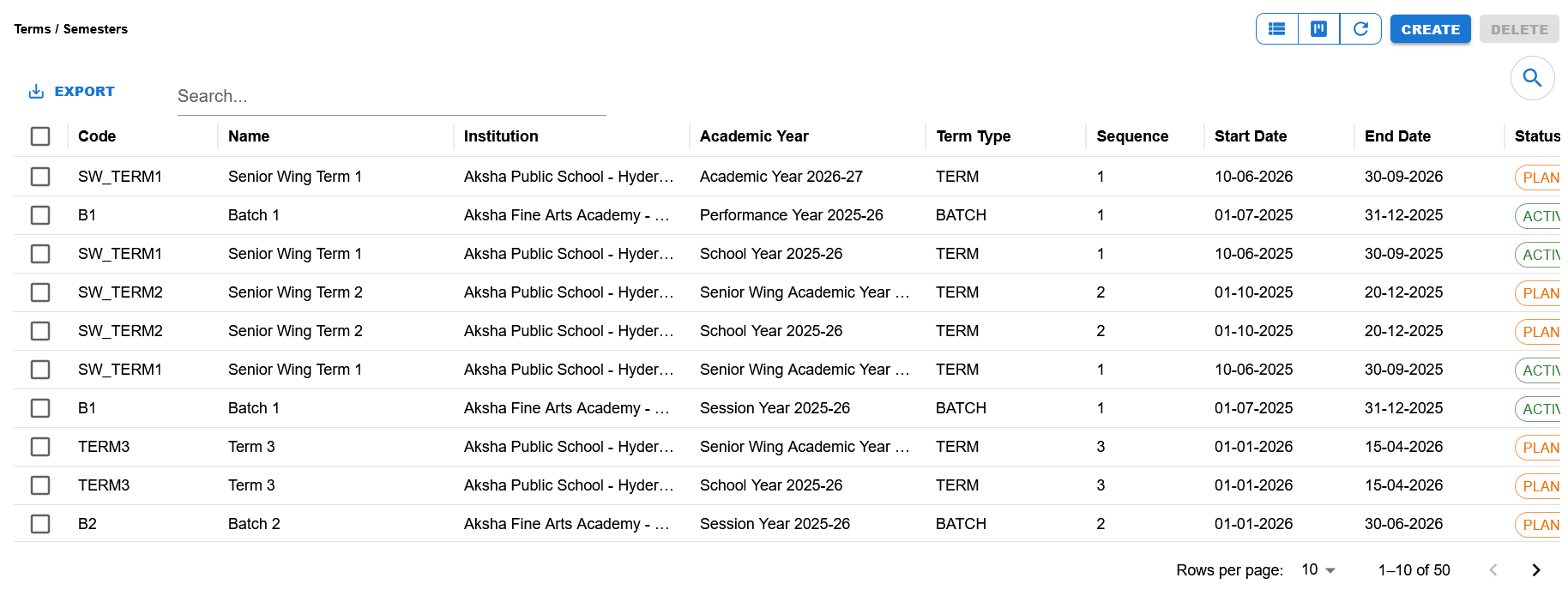
List page showing Code, Name, Institution, Academic Year, Term Type, Sequence, Start Date, End Date, Status, search, export, pagination, and Create/Delete actions.
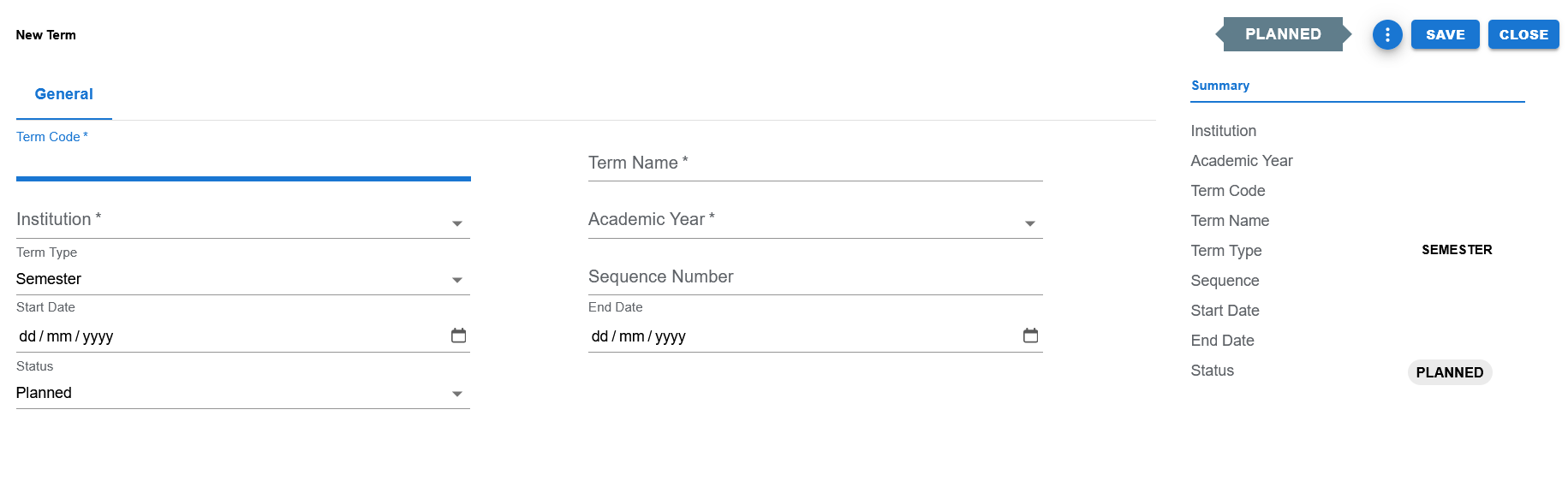
Blank create page showing Institution, Academic Year, Term Code, Term Name, Term Type, Sequence Number, Start Date, End Date, Status, and the summary panel.
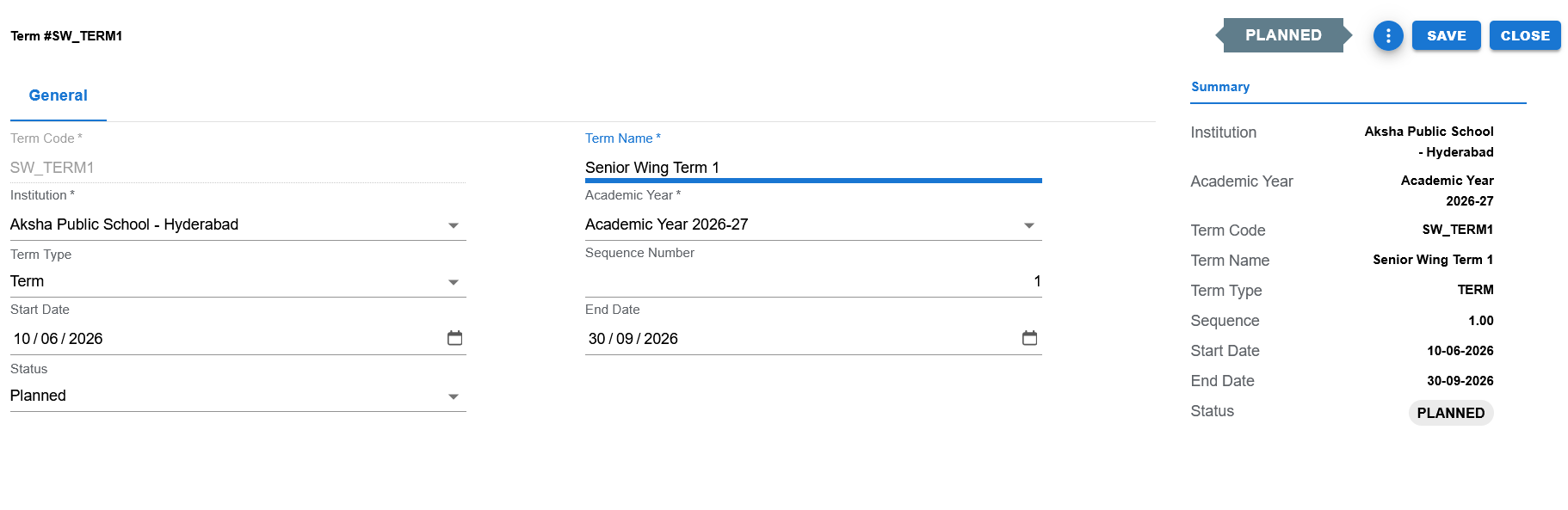
Filled edit example showing Senior Wing Term 1 for Academic Year 2026-27 with Term Type = Term, Sequence = 1, date range, and Status = Planned.
Functional Behavior
- Supports create, update, list, search, export, and list-level delete actions in the UI.
- Save commits the current record and returns to the list page.
- Close returns to the list page without continuing edits.
- The page title changes by mode: New Term in create mode, and Term #CODE in edit mode.
- Status is shown prominently in the page header and summary panel.
- Sequence Number is used to place terms in the intended order within the academic year.
- Term Code behaves like other Education code fields and is typically disabled in edit mode.
Term / Semester header fields
| UI Label | Technical Field | Type | Mandatory | Value Set / LOV | Default | Description | Validation / Rules | Example |
|---|---|---|---|---|---|---|---|---|
| Term Code | term_code | Text | Yes | None | Blank | Unique code for the term or semester within the academic year. | Required. Usually create-only in established Education pattern. | SW_TERM1 |
| Term Name | term_name | Text | Yes | None | Blank | User-facing name of the term, semester, or batch period. | Required. | Senior Wing Term 1 |
| Institution | institution_id | Dropdown / LOV | Yes | Institution LOV | Blank | Institution to which the term belongs. | Required foreign-key reference. | Aksha Public School - Hyderabad |
| Academic Year | academic_year_id | Dropdown / LOV | Yes | Academic Year LOV | Blank | Academic year under which the term is created. | Required. Should belong to the selected institution. | Academic Year 2026-27 |
| Term Type | term_type | Dropdown | Yes | EDU_TERM_TYPE | SEMESTER in current create default | Controls whether the period behaves as a term, semester, batch, or another configured academic period type. | Controlled valueset field. Current UI examples include TERM, SEMESTER, and BATCH. | TERM |
| Sequence Number | sequence_number | Number | No | None | Blank | Defines the order of the term inside the academic year. | Usually numeric and used for ordering. Schema allows it to be nullable, but operational sequencing is recommended. | 1 |
| Start Date | start_date | Date | No | None | Blank | Optional start date of the term period. | When entered, UI shows DD/MM/YYYY style on the form and list/summary present DD-MM-YYYY style. | 10-06-2026 |
| End Date | end_date | Date | No | None | Blank | Optional end date of the term period. | When entered, it should be later than Start Date. | 30-09-2026 |
| Status | status | Dropdown | Yes | EDU_TERM_STATUS | PLANNED | Lifecycle status of the term. | Controlled valueset field. Current UI clearly shows Planned and Active states. | PLANNED |
Page and list actions
| Action | Purpose | Available On | Validation | Outcome |
|---|---|---|---|---|
| Create | Opens create mode for a new term record. | List page | None before opening. | User can enter a new record. |
| Save | Saves the current term and returns to the list page. | Create / Edit page | Code, Name, Institution, Academic Year, Term Type, and Status must pass validation. | Record is created or updated and success feedback is shown. |
| Close | Closes the page and returns to the list. | Create / Edit page | None. | User returns to the list page. |
| Export | Exports list data. | List page | Depends on current list rows. | Export output is produced. |
| Delete | Delete action exists in the list UI. | List page | Business restrictions can be tightened later when downstream dependencies are enforced. | Record can be selected for deletion. |
| Search | Filters visible list rows. | List page | None. | Matching rows remain visible. |
Controlled values
| Field | Value Set Code | Allowed Values | Notes |
|---|---|---|---|
| Term Type | EDU_TERM_TYPE | TERM, SEMESTER, BATCH | The UI and list data show multiple academic period styles, including term and batch examples; the create screen currently shows Semester as the visible default selection. |
| Status | EDU_TERM_STATUS | PLANNED, ACTIVE | The current screenshots clearly show planned and active lifecycle states. |
Reference data and lookups
| Field | Source | Usage |
|---|---|---|
| Institution | Institutions | Required selection used to scope the term. |
| Academic Year | Academic Years | Required selection used to place the term inside a defined academic year. |
Status values
| Status | Meaning | Notes |
|---|---|---|
| PLANNED | Term has been defined but is not yet in active operational use. | Used for upcoming periods and future term planning. |
| ACTIVE | Term is currently active for operational academic use. | Used for periods that are already running in the institution. |
- Term Code is required.
- Term Name is required.
- Institution is required.
- Academic Year is required.
- Term Type is a controlled valueset field.
- Status is a controlled valueset field.
- Sequence Number should normally be unique and ordered within the selected academic year, even if the schema allows null values.
- If Start Date and End Date are entered, End Date should be later than Start Date.
- Academic Year selection should be aligned to the selected institution.
- Dates should follow the established Education pattern: screen-friendly date formatting with server-compatible save formatting underneath.
Operational reference
| Item | Value |
|---|---|
| Feature Structure | Header Only |
| Operational Scope | Defines terms, semesters, quarters, or batch periods inside the selected academic year. |
| Key Dependencies | Institution and Academic Year are required before a term can be created. |
| Used Before | Course Registrations, Fee Demand timing, Assessments, Result processing, and academic scheduling. |
| Public Documentation Note | This public page explains the operational term structure without exposing internal technical details. |
Example Record
Sample term
| Field | Example Value |
|---|---|
| Institution | Aksha Public School - Hyderabad |
| Academic Year | Academic Year 2026-27 |
| Term Code | SW_TERM1 |
| Term Name | Senior Wing Term 1 |
| Term Type | TERM |
| Sequence Number | 1 |
| Start Date | 10-06-2026 |
| End Date | 30-09-2026 |
| Status | PLANNED |