
Documentation
Programs
Programs defines the academic or institutional offering such as a school program, degree, diploma, certificate, or academy pathway. This page follows the locked AkshaEDU header + lines standard and documents the header fields, child tabs, list behavior, validations, valuesets, LOVs, screenshots, and operational guidance in one repeatable format.
Purpose
Programs is used to define the formal academic or institutional offering such as a school program, degree, diploma, certificate, vocational track, or academy pathway.
This feature belongs to AkshaEDU Setup > Academic Setup and follows the standard Education header + lines pattern with a General tab for the header and child tabs for Versions and Program Terms.
Business Purpose
Use Programs to organize the main educational offerings that learners enroll into. Programs act as a bridge between institution structure and downstream execution such as courses, batches, fee structures, enrollments, and assessment planning.
The page supports school, university, and academy scenarios. The screenshots show examples ranging from school programs and degrees to certificates and diplomas, which reflects the broader AkshaEDU product scope.
- Defines the main offering delivered by an institution, campus, or academic unit.
- Supports different delivery lengths such as months and years.
- Maintains program version history through a dedicated Versions child tab.
- Maintains the internal term structure of the program through a dedicated Program Terms child tab.
Screen Structure
Available screens and regions
| Screen / Region | Purpose | Notes |
|---|---|---|
| List Page | Displays program records with search, export, visible columns, status handling, pagination, and row actions. | Visible screenshot columns include Code, Name, Institution, Campus, Academic Unit, Program Type, Duration Value, and Duration Unit. |
| General Tab | Captures the program header details. | Programs is a header + lines feature. The header remains in the parent view. |
| Versions Tab | Maintains program version rows. | Visible columns include Version, Effective From, Effective To, Version Status, and Notes. |
| Program Terms Tab | Maintains internal term or level rows for the program. | Visible columns include Program Term Name, Sequence, Credits Required, and Status. |
| Summary Panel | Shows a quick snapshot of the current record and child-line counts. | Displays Program Code, Program Name, Institution, Campus, Academic Unit, Program Type, Versions count, Program Terms count, and Status. |
Screenshots
Programs is best documented with four visuals: the list page, the create page, the main edit page with Versions tab active, and the Program Terms tab. Showing them one below another keeps the header and line structure readable.
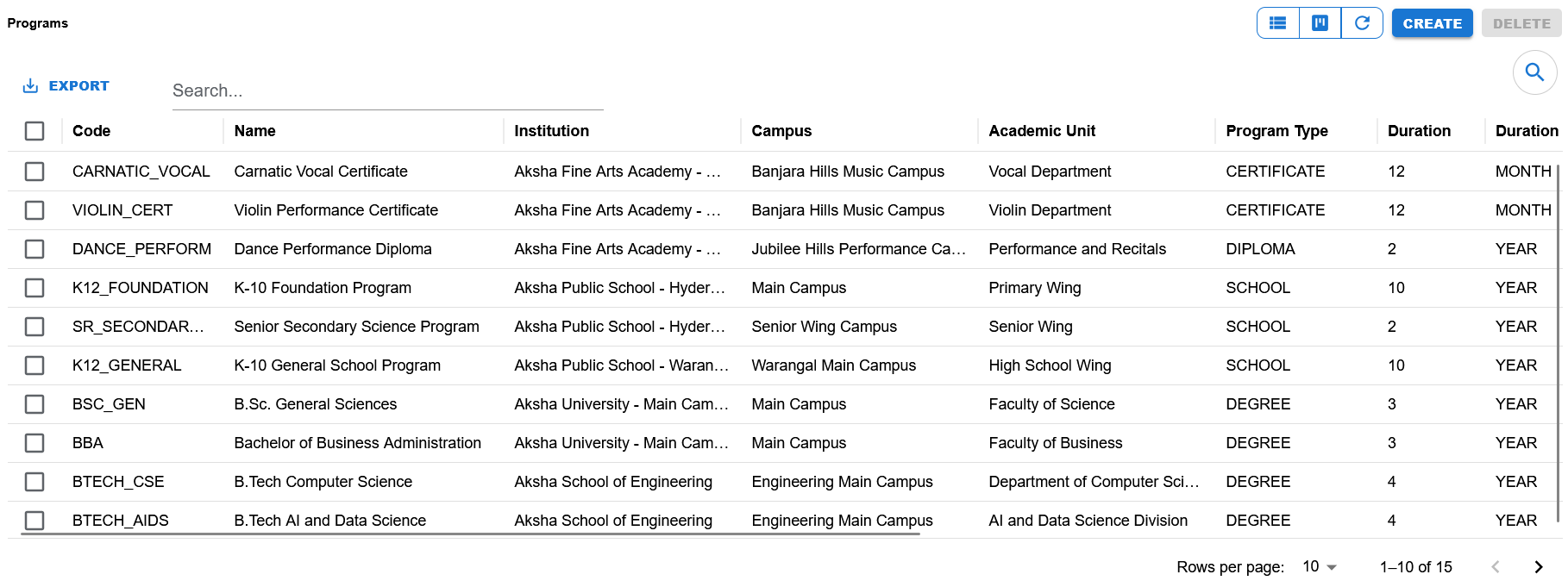
List view showing search, export, visible columns, create/delete actions, pagination, and examples of school, university, and academy programs.
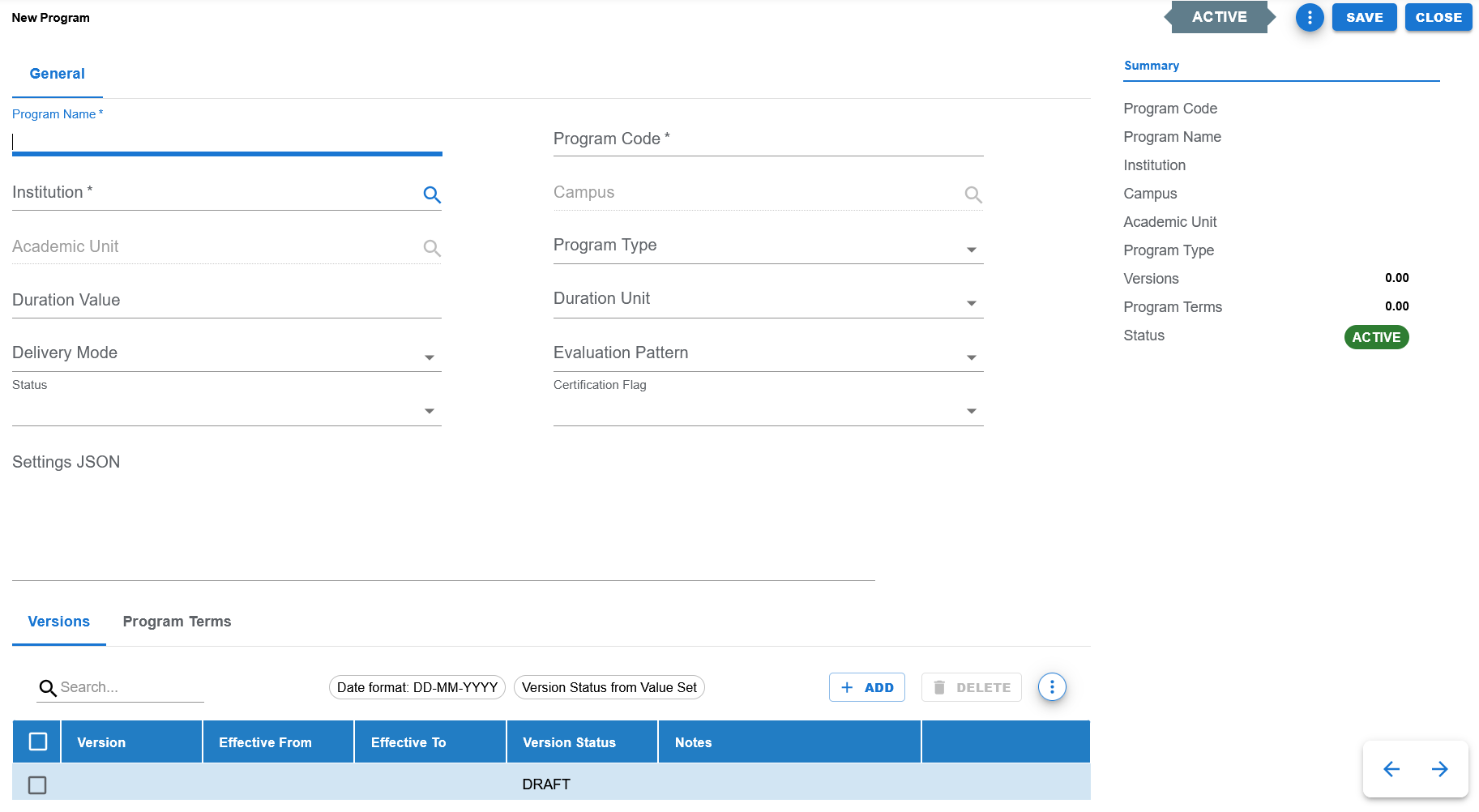
Blank create screen showing the General tab, Summary panel, and child tabs for Versions and Program Terms.
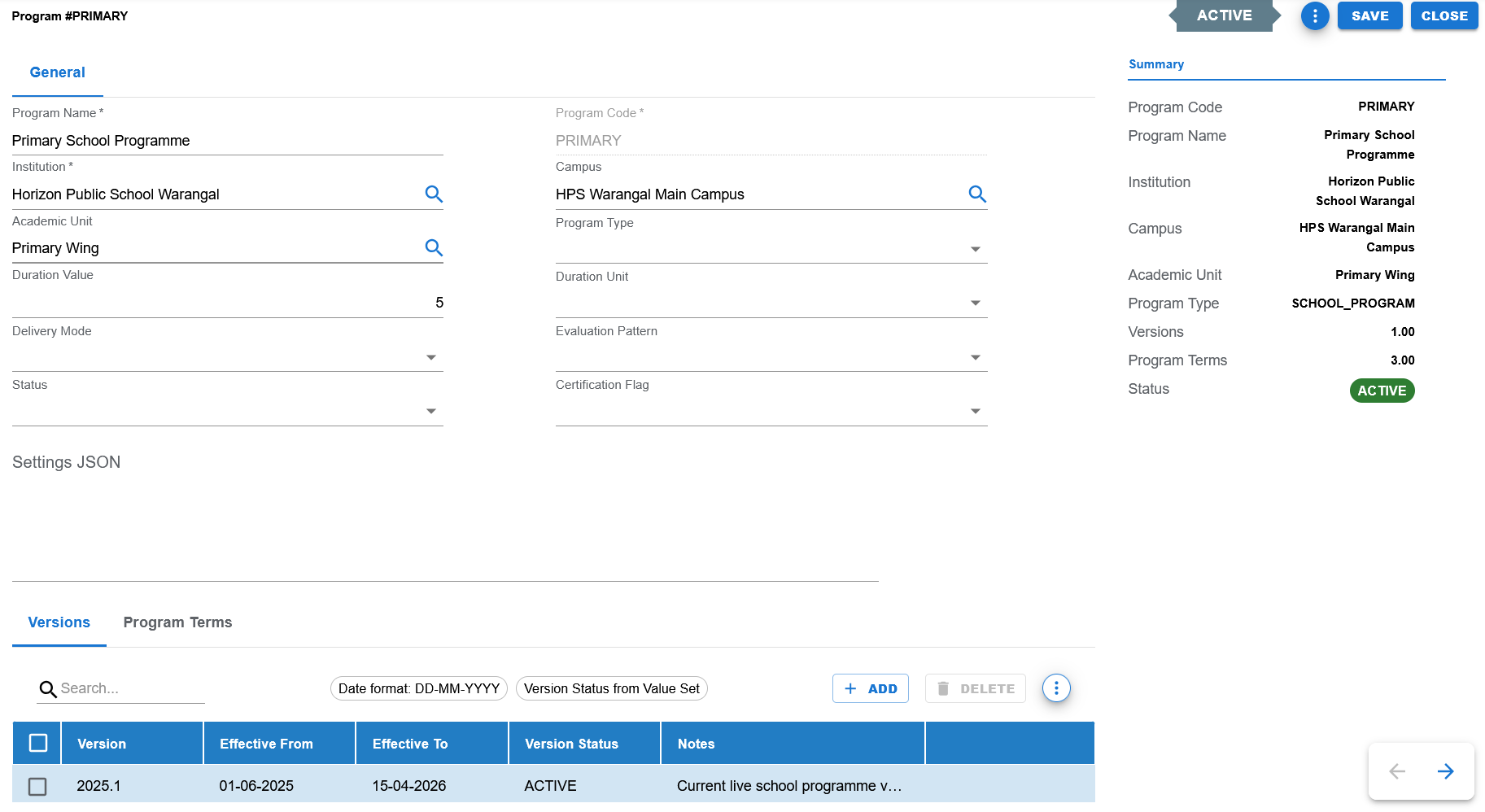
Filled example showing program header details and the Versions child tab with version history rows.
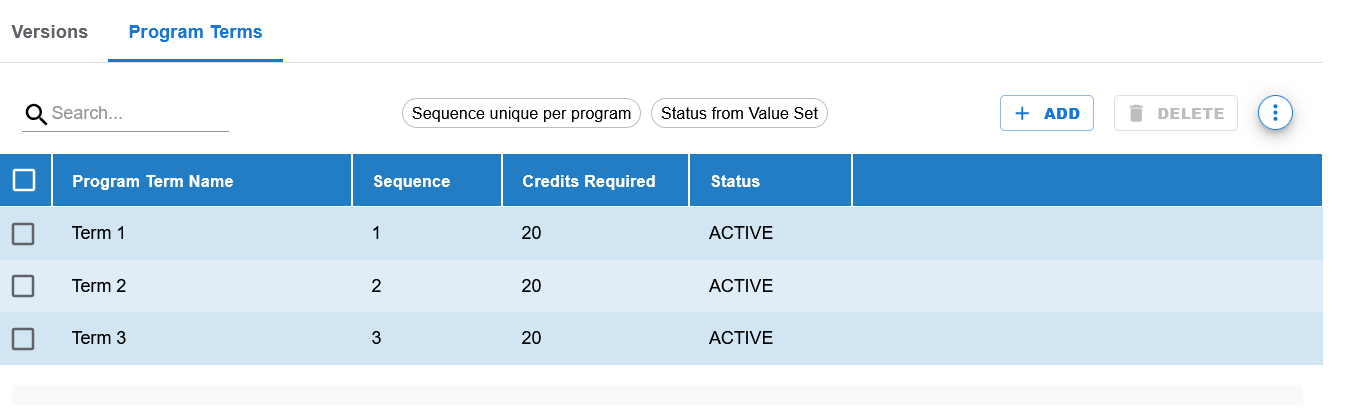
Program Terms child tab showing term rows with sequence and credits required values.
Functional Behavior
- Supports create, update, list, search, export, and list-level delete actions in the UI.
- The page follows the AkshaEDU header + lines pattern with General, Versions, and Program Terms tabs.
- Save commits the current program and returns to the list page.
- Apply saves the program and remains on the current page when configured in the action menu.
- Close returns to the list page without continuing edits.
- Program Code is editable on create and expected to be locked in edit mode, consistent with the settled Education pattern.
- Summary panel shows both header information and child counts for Versions and Program Terms.
Program header fields
| UI Label | Technical Field | Type | Mandatory | Value Set / LOV | Default | Description | Validation / Rules | Example |
|---|---|---|---|---|---|---|---|---|
| Institution | institution_id | Autocomplete / LOV | Yes | Institution LOV | Blank | Defines the institution owning the program. | Required LOV-backed foreign key. | Aksha University - Main Campus |
| Campus | campus_id | Autocomplete / LOV | No | Campus LOV | Blank | Optional campus scope for the program. | Campus should belong to the selected institution. | Main Campus |
| Academic Unit | academic_unit_id | Autocomplete / LOV | No | Academic Unit LOV | Blank | Optional department, wing, faculty, or division linked to the program. | Academic Unit should belong to the selected institution/campus context. | Faculty of Business |
| Program Name | program_name | Text | Yes | None | Blank | Business name of the program. | Required. | Bachelor of Business Administration |
| Program Code | program_code | Text | Yes | None | Blank | Unique identifying code for the program. | Required. Expected to be disabled in edit mode. | BBA |
| Program Type | program_type | Dropdown | No | EDU_PROGRAM_TYPE | Blank | Classifies the program type. | Controlled valueset field. | DEGREE |
| Duration Value | duration_value | Number | No | None | Blank | Numeric duration of the program. | Used with Duration Unit. | 3 |
| Duration Unit | duration_unit | Dropdown | No | EDU_DURATION_UNIT | Blank | Unit for the program duration. | Controlled valueset field. | YEAR |
| Delivery Mode | delivery_mode | Dropdown | No | EDU_DELIVERY_MODE | Blank | How the program is delivered. | Controlled valueset field. | REGULAR |
| Evaluation Pattern | evaluation_pattern | Dropdown | No | EDU_EVALUATION_PATTERN | Blank | Overall evaluation structure for the program. | Controlled valueset field. | SEMESTER |
| Certification Flag | certification_flag | Dropdown | No | EDU_YES_NO | No | Indicates whether the program results in a certification outcome. | Controlled yes/no field. | No |
| Status | status | Dropdown | Yes | EDU_STATUS | ACTIVE | Business status of the program. | Controlled valueset field. | ACTIVE |
| Settings JSON | settings_json | JSON / Text | No | None | Blank | Structured JSON for program-specific settings. | Optional JSON field. Should hold valid JSON structure when used. | {"industryProjects":"Y"} |
Child Tabs Overview
Child tabs
| Tab Name | Purpose | Notes |
|---|---|---|
| Versions | Maintains program version history. | Used to track version number, effective dates, status, and notes. |
| Program Terms | Maintains the internal term structure of the program. | Used to define term name, sequence, credits required, and status. Sequence is unique per program. |
Versions tab fields
| UI Label | Technical Field | Type | Mandatory | Value Set / LOV | Description | Rules / Notes | Example |
|---|---|---|---|---|---|---|---|
| Version | version_number | Text | Yes | None | Version identifier for the program version row. | Unique per program. | 1.0 |
| Effective From | effective_from | Date | No | None | Start date of the version. | Displayed in DD-MM-YYYY and saved in YYYY-MM-DD. | 01-06-2025 |
| Effective To | effective_to | Date | No | None | End date of the version. | Displayed in DD-MM-YYYY and saved in YYYY-MM-DD. | 31-05-2028 |
| Version Status | version_status | Dropdown | Yes | EDU_PROGRAM_VERSION_STATUS | Lifecycle state of the version row. | Controlled valueset field; screenshot shows DRAFT and ACTIVE usage. | ACTIVE |
| Notes | notes | Text | No | None | Additional notes about the version. | Optional. | Revised business analytics and internship requirements. |
Program Terms tab fields
| UI Label | Technical Field | Type | Mandatory | Value Set / LOV | Description | Rules / Notes | Example |
|---|---|---|---|---|---|---|---|
| Program Term Name | term_name | Text | Yes | None | Name of the term within the program. | Required. | Semester 1 |
| Sequence | sequence_number | Number | Yes | None | Ordering of the term within the program. | Sequence should be unique per program. | 1 |
| Credits Required | credits_required | Number | No | None | Credits associated with the term. | Optional numeric field. | 20 |
| Status | status | Dropdown | Yes | EDU_STATUS | Business status of the term row. | Controlled valueset field. | ACTIVE |
Page and line actions
| Action | Purpose | Available On | Validation | Outcome |
|---|---|---|---|---|
| Create | Opens create mode for a new program record. | List page | None before opening. | User can enter header details and child rows. |
| Save | Saves the current program and returns to the list. | Create / Edit page | Header mandatory fields and child validations must pass. | Program and child rows are committed. |
| Apply | Saves the current program and remains on the same page. | Create / Edit page action menu | Same validation as Save. | Program and child rows are committed without leaving the page. |
| Close | Closes the page and returns to the list. | Create / Edit page | None. | User returns to the list page. |
| Add | Adds a new child row in the active child tab. | Versions / Program Terms tabs | Depends on active tab validation. | A blank row is inserted. |
| Delete | Deletes selected child rows or list rows depending on context. | List page and child tabs | Behavior depends on row persistence and business rules. | Rows are removed or marked for deletion. |
| Search | Filters visible lines in the active tab or list rows in the list page. | List page and child tab search bars | None. | Matching rows remain visible. |
- Programs follows the standard AkshaEDU header + lines contract for child rows.
- C = Create
- E = Edit
- D = Delete
- N = No Change
- Unsaved deleted rows are removed from UI state, while persisted deleted rows remain tracked until save.
- Final save payload is built in the parent view; child tabs only manage row editing and push rows back up.
- Dates in Versions rows should display in DD-MM-YYYY on the screen.
- Dates should be converted to YYYY-MM-DD when saved to the server.
- If a date is blank and the current AkshaEDU pattern expects an empty value, send empty string rather than null.
- Effective From should not be later than Effective To when both dates are entered.
Controlled values
| Field | Value Set Code | Allowed Values / Examples | Notes |
|---|---|---|---|
| Program Type | EDU_PROGRAM_TYPE | Examples shown in UI and list include CERTIFICATE, DIPLOMA, SCHOOL, and DEGREE. | Program classification field. |
| Duration Unit | EDU_DURATION_UNIT | MONTH, YEAR and other seeded duration units as applicable. | Used with Duration Value. |
| Delivery Mode | EDU_DELIVERY_MODE | Example shown: REGULAR. | Program delivery method. |
| Evaluation Pattern | EDU_EVALUATION_PATTERN | Example shown: SEMESTER. | Evaluation structure field. |
| Certification Flag | EDU_YES_NO | Y, N / Yes, No | Boolean-style certification indicator. |
| Program Status | EDU_STATUS | ACTIVE, INACTIVE | Header status field. |
| Version Status | EDU_PROGRAM_VERSION_STATUS | Examples include DRAFT and ACTIVE depending on the row lifecycle. | Used in the Versions child tab. |
| Program Term Status | EDU_STATUS | ACTIVE, INACTIVE | Used in Program Terms rows. |
Reference data and lookups
| Field | Source | Usage |
|---|---|---|
| Institution | Institutions | Required LOV used to define the owning institution. |
| Campus | Campuses | Optional LOV used to scope the program to a campus. |
| Academic Unit | Academic Units | Optional LOV used to assign the program to a department, faculty, wing, or division. |
Status values
| Status | Meaning | Notes |
|---|---|---|
| ACTIVE | Program or child row is available for normal operational use. | Default status shown in the screenshots for the header and Program Terms rows. |
| INACTIVE | Program or child row exists but is not active for normal operational use. | Useful for history and controlled deactivation. |
| DRAFT | Version row is still under preparation and not yet final. | Visible in the create screenshot for the Versions tab. |
| ACTIVE (Version) | Version row is the currently usable or approved version. | Visible in the edit screenshot for the Versions tab. |
- Program Name and Program Code are key header fields and should be treated as required.
- Programs follows the settled header + lines structure for program header, versions, and program terms.
- Institution, Campus, and Academic Unit are LOV-backed reference fields.
- Program Code should remain unique within the institution scope.
- Version number should be unique within a program.
- Program term sequence should be unique within a program.
- Effective From and Effective To should respect chronological order when both values are entered.
- Settings JSON should contain valid JSON when used.
- Summary panel counts help users verify whether version and program-term rows are present before save.
Operational reference
| Item | Value |
|---|---|
| Feature Structure | Header + Lines |
| Operational Scope | Defines the academic offering together with version history and internal program term structure. |
| Related Tabs | Versions and Program Terms. |
| Key Dependencies | Institution is primary; Campus and Academic Unit are used where the program is scoped to a specific location or structure. |
| Public Documentation Note | This public page explains user-visible setup behavior and intentionally excludes internal technical details. |
Example Record
Sample program
| Field | Example Value |
|---|---|
| Program Code | BBA |
| Program Name | Bachelor of Business Administration |
| Institution | Aksha University - Main Campus |
| Campus | Main Campus |
| Academic Unit | Faculty of Business |
| Program Type | DEGREE |
| Duration Value | 3 |
| Duration Unit | YEAR |
| Delivery Mode | REGULAR |
| Evaluation Pattern | SEMESTER |
| Certification Flag | No |
| Versions Count | 1 |
| Program Terms Count | 6 |
| Status | ACTIVE |