
Documentation
Academic Units
Academic Units defines departments, wings, cells, schools, divisions, and similar internal academic structures within an institution or campus. This page follows the locked AkshaEDU header-only standard and documents purpose, navigation, screens, fields, dependency rules, value sets, list behavior, validations, and operational guidance.
Purpose
Academic Units is used to define the internal academic or administrative structure under an institution, and optionally under a specific campus. Typical examples include departments, schools, wings, divisions, examination cells, administration units, and similar organization units.
This feature belongs to AkshaEDU Setup > Institution Setup and follows the standard Education header-only list and view pattern for setup masters.
Business Purpose
Use Academic Units when the institution needs a structured internal hierarchy for academic management, reporting, ownership, and downstream references. The same feature supports structures such as school wings, departments, cells, administrative units, and specialized academic divisions.
Academic Units is foundational because programs, courses, staff profiles, and other future education features may depend on this structure for classification and reporting.
- Supports both academic and non-academic organizational units.
- Allows unit hierarchy through Parent Academic Unit.
- Can be institution-wide or campus-specific.
- Provides a clean setup layer for future academic ownership and reporting models.
Screen Overview
Available screens
| Screen | Purpose | Notes |
|---|---|---|
| List Page | Displays all academic unit records with search, export, selection, pagination, row actions, and status display. | Visible columns include Code, Name, Unit Type, Institution, Campus, Parent Unit, Head Staff ID, and Status. |
| Create Page | Allows users to create a new academic unit record. | Uses the standard Education ResponsiveContainer layout with Save, Close, and Apply actions. |
| Edit Page | Allows users to update an existing academic unit record. | Unit Code is visible but disabled in edit mode. |
| General Tab | Captures all academic unit header fields. | Academic Units is a header-only feature with one General tab. |
| Status Banner | Shows the current document status at the top of the page. | Current UI supports ACTIVE and INACTIVE through EDU_STATUS. |
Screenshots
Academic Units is documented with three visuals shown one below another so the list page, create page, and filled edit page remain readable.
The current screenshots clearly show the full General tab because this is a header-only setup feature.
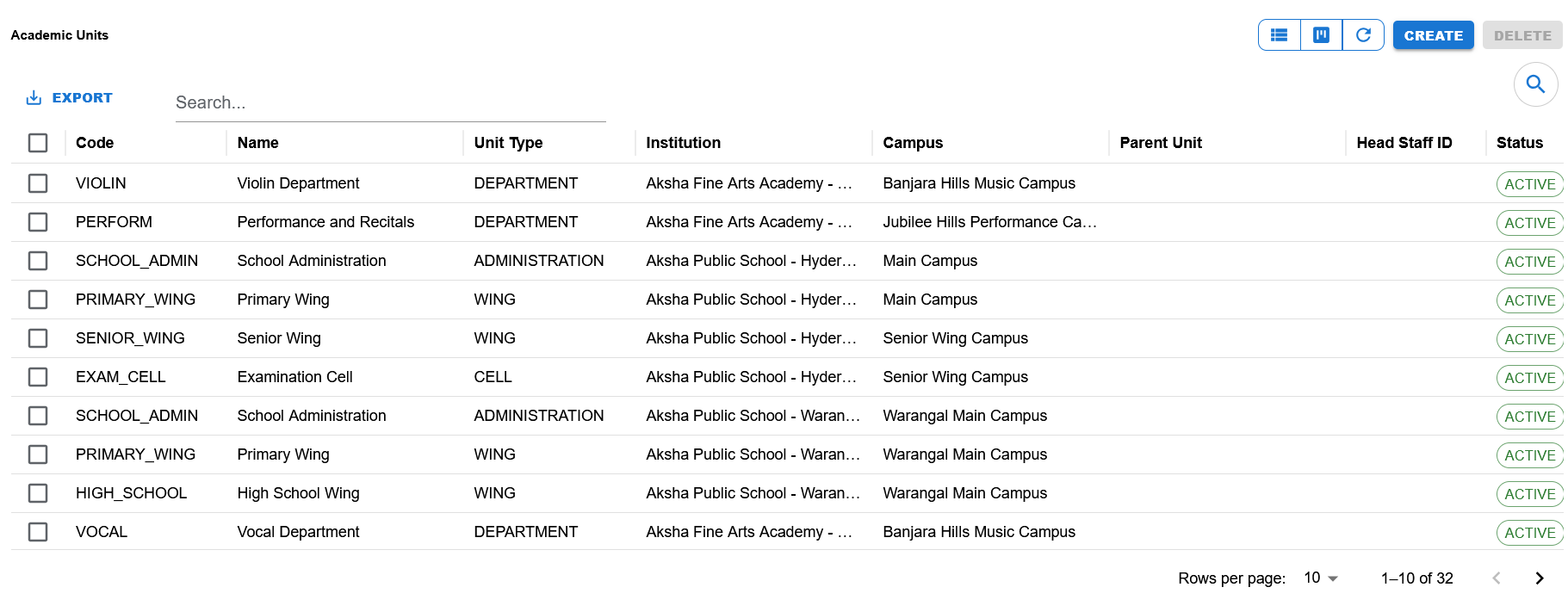
List page showing search, export, visible columns, status chips, row actions, pagination, and Create/Delete actions.
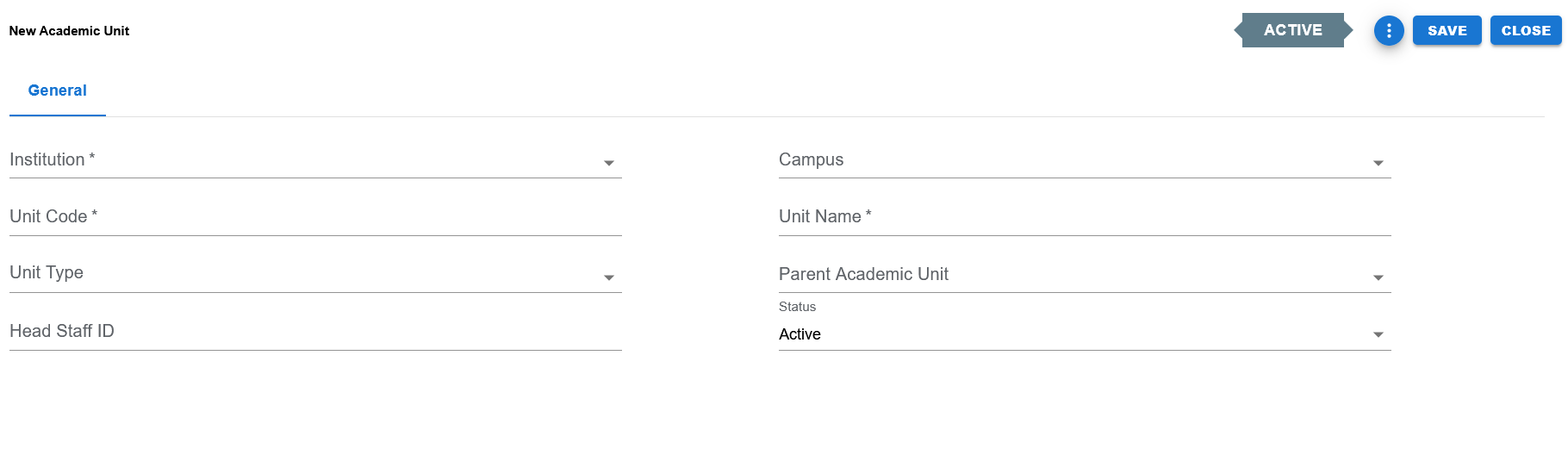
Blank create screen showing Institution, Campus, Unit Code, Unit Name, Unit Type, Parent Academic Unit, Head Staff ID, Status, and the Save / Close / Apply actions.
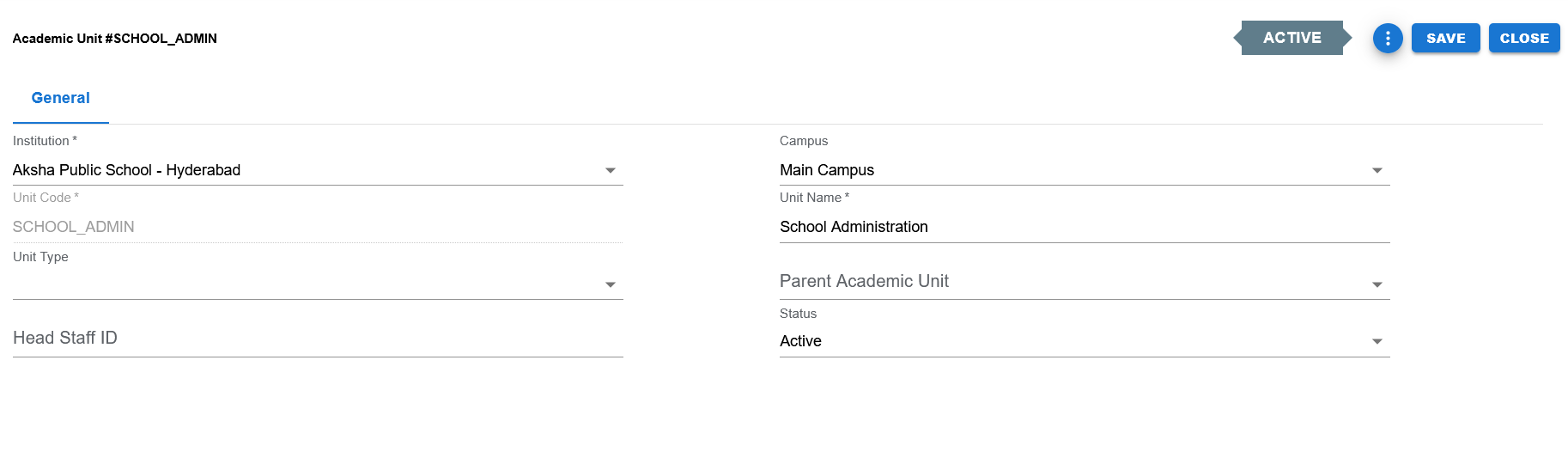
Filled example showing Institution, Campus, Unit Code, Unit Name, Unit Type, Parent Academic Unit, Head Staff ID, and Status in edit mode.
Functional Behavior
- Supports create, update, list, search, export, and list-level delete actions in the UI.
- Academic Units uses a single General tab because it is a header-only setup feature.
- Save commits the record and returns to the list page.
- Apply commits the record and stays on the same page.
- Close returns to the list page without continuing edits.
- Unit Code is editable during create and disabled during edit.
- The page title changes by mode: New Academic Unit in create mode, and Academic Unit #CODE in edit mode.
- The summary panel shows Unit Code, Unit Name, Institution, Campus, Parent Unit, Unit Type, Head Staff ID, and Status.
Academic unit header fields
| UI Label | Technical Field | Type | Mandatory | Value Set / LOV | Default | Description | Validation / Rules | Example |
|---|---|---|---|---|---|---|---|---|
| Institution | institution_id | Select / LOV-backed option list | Yes | Institution list from GET_ALL_INSTITUTIONS | Blank | Institution under which the academic unit is created. | Required. When Institution changes, Campus and Parent Academic Unit are cleared. | Aksha Public School - Hyderabad |
| Campus | campus_id | Select / LOV-backed option list | No | Campus list from GET_ALL_CAMPUSES | Blank | Optional campus under the selected institution. | Optional. Campus list is filtered by selected Institution. When Campus changes, Parent Academic Unit is cleared. | Main Campus |
| Unit Code | unit_code | Text | Yes | None | Blank | Unique identifying code for the academic unit. | Required. Disabled in edit mode. Trimmed before save through parent view sanitization path. | SCHOOL_ADMIN |
| Unit Name | unit_name | Text | Yes | None | Blank | Business name of the academic unit. | Required. | School Administration |
| Unit Type | unit_type | Dropdown | No in current UI | EDU_ACADEMIC_UNIT_TYPE | Blank | Classifies the type of academic unit. | Controlled valueset field using DynamicDropdown. | ADMINISTRATION |
| Parent Academic Unit | parent_academic_unit_id | Select / LOV-backed option list | No | Academic Unit option list from GET_ALL_ACADEMIC_UNITS | Blank | Optional parent unit used to create hierarchy. | Filtered by selected Institution and Campus. Current record is excluded in edit mode. | PRIMARY_WING |
| Head Staff ID | head_staff_id | Text / Numeric | No | None currently in UI | Blank | Stores the head staff reference for the academic unit. | Current UI keeps this as a direct field, and save logic converts numeric values to a nullable number. | 1025 |
| Status | status | Dropdown | Yes | EDU_STATUS | ACTIVE | Current operational status of the academic unit. | Controlled valueset field. Defaults to ACTIVE. | ACTIVE |
Dynamic Dependency Rules
- Changing Institution clears Campus, Campus Name, Parent Academic Unit, and Parent Unit Name.
- Changing Campus clears Parent Academic Unit and Parent Unit Name.
- Campus options are filtered so only campuses belonging to the selected Institution are shown.
- Parent Academic Unit options are filtered by Institution and, when a Campus is selected, by Campus as well.
- In edit mode, the current Academic Unit is removed from Parent Academic Unit options so the record cannot become its own parent.
- Institution Name, Campus Name, and Parent Unit Name displayed in the summary panel are derived from the selected option lists.
Controlled values
| Field | Value Set Code | Allowed Values / Examples | Notes |
|---|---|---|---|
| Unit Type | EDU_ACADEMIC_UNIT_TYPE | Examples visible from data include DEPARTMENT, ADMINISTRATION, WING, CELL and other seeded education unit types. | Used by DynamicDropdown in the General tab. |
| Status | EDU_STATUS | ACTIVE, INACTIVE | Used by DynamicDropdown in the General tab and by the header status badge. |
Reference data and option sources
| Field | Source | Usage |
|---|---|---|
| Institution | Institutions | Select list built from GET_ALL_INSTITUTIONS and used as the primary context for the record. |
| Campus | Campuses | Select list built from GET_ALL_CAMPUSES and filtered by Institution. |
| Parent Academic Unit | Academic Units | Select list built from GET_ALL_ACADEMIC_UNITS and filtered by Institution, Campus, and current record exclusion logic. |
Status values
| Status | Meaning | Notes |
|---|---|---|
| ACTIVE | Academic Unit is available for normal operational use. | Default status in the current UI and save logic. |
| INACTIVE | Academic Unit exists but is not active for normal operational use. | Supported through EDU_STATUS even if the screenshots mainly show ACTIVE examples. |
- Institution is required.
- Unit Code is required.
- Unit Name is required.
- Status defaults to ACTIVE when blank or invalid.
- Head Staff ID is currently stored from a free-entry field and converted to a nullable numeric value on save.
- Campus is optional, allowing institution-level units as well as campus-specific units.
- Parent Academic Unit is optional, allowing flat as well as hierarchical structures.
- Code field is disabled in edit mode to preserve identifier stability.
Operational reference
| Item | Value |
|---|---|
| Feature Structure | Header Only |
| Operational Scope | Defines the internal department, wing, school, cell, division, or administrative hierarchy within an institution or campus. |
| Key Dependencies | Institution is required; Campus and Parent Academic Unit are optional based on the structure being maintained. |
| Used Before | Programs, Courses, Staff Assignments, Faculty setup, and internal reporting structures. |
| Public Documentation Note | This public page explains hierarchy behavior and setup dependency without exposing internal technical references. |
Example Record
Sample academic unit
| Field | Example Value |
|---|---|
| Institution | Aksha Public School - Hyderabad |
| Campus | Main Campus |
| Unit Code | SCHOOL_ADMIN |
| Unit Name | School Administration |
| Unit Type | ADMINISTRATION |
| Parent Academic Unit | None |
| Head Staff ID | Blank / not assigned |
| Status | ACTIVE |