
Documentation
Institutions
Institutions defines the main education entity such as a school, college, university, academy, or training institute. This page follows the locked AkshaEDU header + lines standard and documents the header fields, child tabs, list behavior, validations, value sets, LOVs, screenshots, and operational guidance in one repeatable format.
Purpose
Institutions is used to create the main education entity record such as a school, junior college, university, academy, skill institute, or similar organization-level unit.
This feature is the first full header + child-tabs documentation page in AkshaEDU. It combines the institution header with reusable child tabs for Contacts, Addresses, Affiliations, and Settings.
Business Purpose
Use Institutions to define each operating institution under an optional Institution Group. This becomes the parent record for campuses, academic units, working calendars, fees, learners, staff, and many other downstream education processes.
An Institution can be used independently for standalone organizations or as part of a larger Institution Group for school networks, trusts, universities, or academy chains.
- Captures the main identity and classification of the institution.
- Supports both grouped and standalone institution setups.
- Provides reusable child tabs for contacts, addresses, affiliations, and institution settings.
- Acts as a parent for several downstream masters and transactions across AkshaEDU.
Screen Structure
Available screens and regions
| Screen / Region | Purpose | Notes |
|---|---|---|
| List Page | Displays institutions with search, export, selection, visible columns, and row actions. | Visible screenshot columns include Institution Code, Institution Name, Institution Type, Institution Group, Display Name, Board / Affiliation, and Email. |
| Header Area | Captures the main institution details. | Uses the standard Education view layout with General tab first. |
| Child Tabs | Captures related lines for contacts, addresses, affiliations, and settings. | Institutions is a header + lines feature. |
| Summary Panel | Shows a quick snapshot of the current record and child line counts. | Visible in both create and edit screens. |
Screenshots
This feature is documented with three visuals shown one below another so each screen remains readable: the list page, the create page, and a filled example edit page.
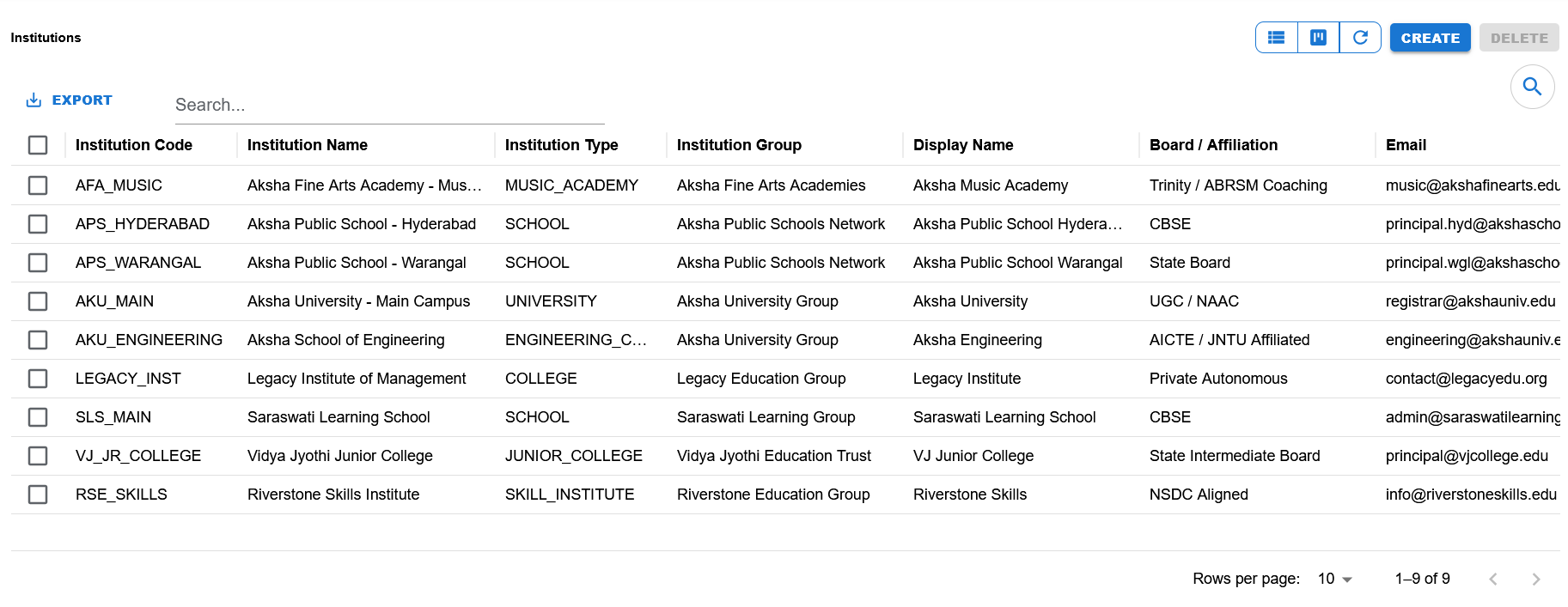
List view showing search, export, visible columns, row actions, create/delete actions, and pagination.
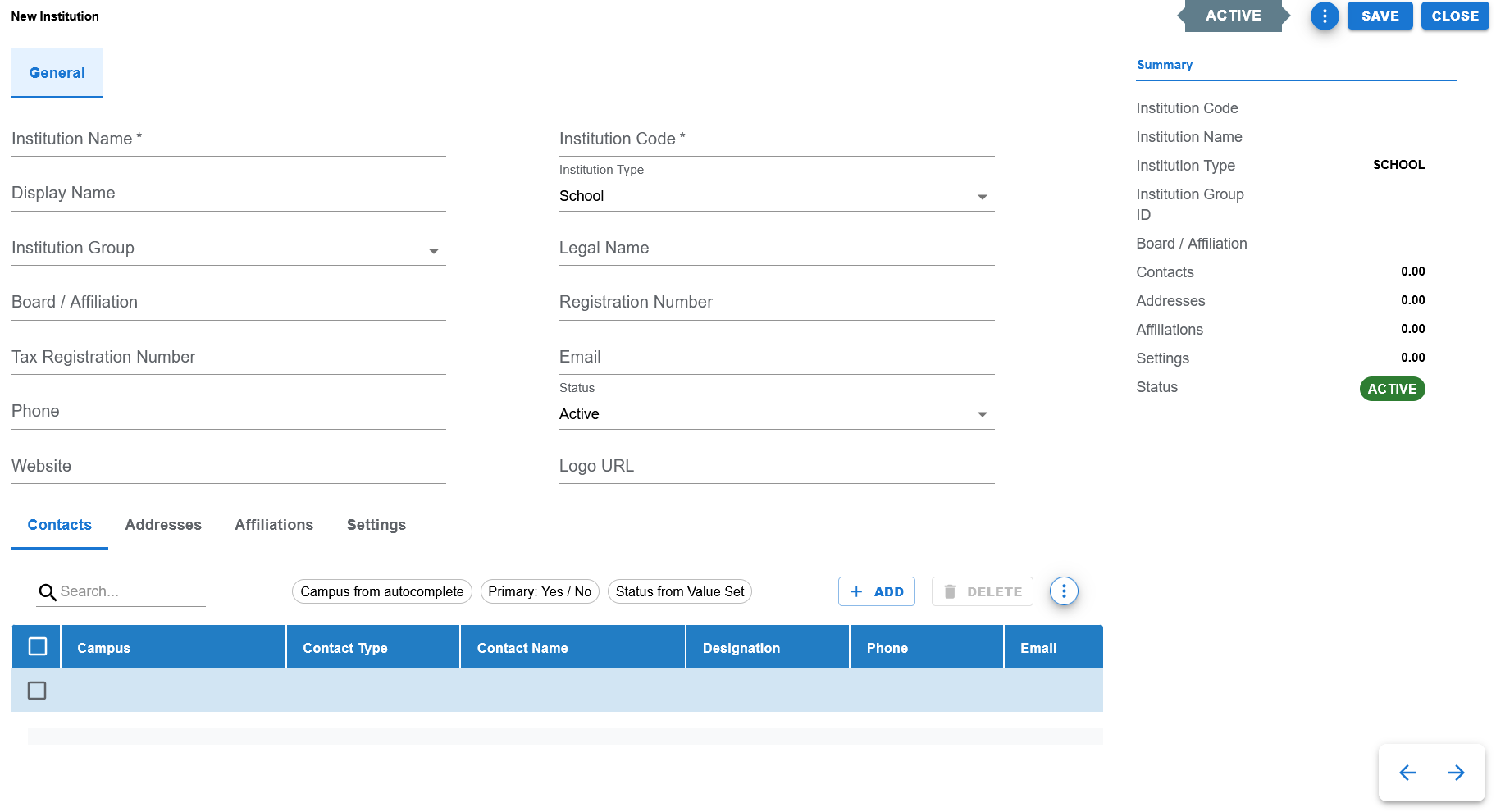
Blank create screen showing General tab, summary panel, default status, and child tabs available for Contacts, Addresses, Affiliations, and Settings.
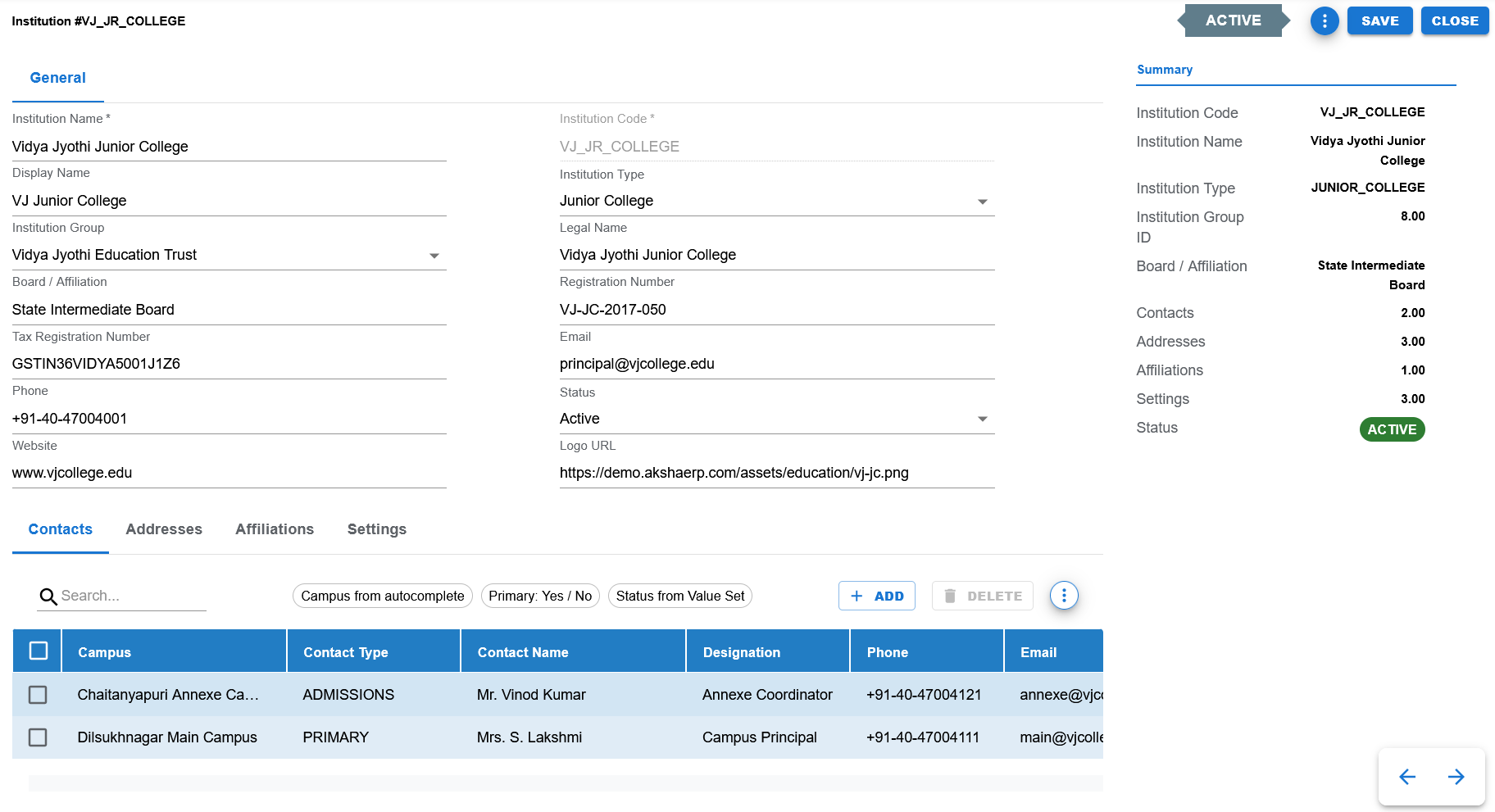
Filled example showing header details and the Contacts tab with child rows.
Functional Behavior
- Supports create, update, list, search, export, and list-level delete actions in the UI.
- The page follows the AkshaEDU header + tabs pattern with General, Contacts, Addresses, Affiliations, and Settings tabs.
- Save commits the current institution and returns to the list page.
- Close returns to the list page without continuing edits.
- The status indicator is visible in the page header and summary panel.
- The Summary panel shows both header information and child line counts for Contacts, Addresses, Affiliations, and Settings.
- Institution Code is expected to behave like other Education code fields and is typically editable on create and locked on edit.
Institution header fields
| UI Label | Technical Field | Type | Mandatory | Value Set / LOV | Default | Description | Validation / Rules | Example |
|---|---|---|---|---|---|---|---|---|
| Institution Name | institution_name | Text | Yes | None | Blank | Primary business name of the institution. | Required. | Vidya Jyothi Junior College |
| Institution Code | institution_code | Text | Yes | None | Blank | Unique identifying code for the institution. | Required. Expected to be create-only for editing, aligned with Education code-field pattern. | VJ_JR_COLLEGE |
| Display Name | display_name | Text | No | None | Blank | Short user-facing display name. | Optional. | VJ Junior College |
| Institution Type | institution_type | Dropdown | Yes | EDU_INSTITUTION_TYPE | Blank | Classifies the type of institution. | Controlled valueset field. | JUNIOR_COLLEGE |
| Institution Group | institution_group_id | Autocomplete / LOV | No | Institution Group LOV | Blank | Links the institution to an Institution Group when applicable. | Foreign-key LOV field. | Vidya Jyothi Education Trust |
| Legal Name | legal_name | Text | No | None | Blank | Registered or legal name of the institution. | Optional. | Vidya Jyothi Junior College |
| Board / Affiliation | board_or_affiliation | Text | No | None | Blank | Board, affiliation body, or academic governing reference. | Optional. | State Intermediate Board |
| Registration Number | registration_number | Text | No | None | Blank | Legal or institution registration number. | Optional. | VJ-JC-2017-050 |
| Tax Registration Number | tax_registration_number | Text | No | None | Blank | Tax registration reference. | Optional. | GSTIN36VIDYA5001J1Z6 |
| Text | No | None | Blank | Primary institution email address. | Optional. | principal@vjcollege.edu | ||
| Phone | phone | Text | No | None | Blank | Primary institution phone number. | Optional. | +91-40-47004001 |
| Website | website | Text | No | None | Blank | Institution website URL. | Optional. | www.vjcollege.edu |
| Status | status | Dropdown | Yes | EDU_STATUS | ACTIVE | Business status of the institution. | Controlled valueset field. | ACTIVE |
| Logo URL | logo_url | Text | No | None | Blank | Image URL for the institution logo. | Optional. | https://demo.akshaerp.com/assets/education/vj-jc.png |
Child Tabs Overview
Child tabs
| Tab Name | Purpose | Notes |
|---|---|---|
| Contacts | Maintain institution-level or campus-scoped contacts. | Contact type and status are expected to be controlled fields. |
| Addresses | Maintain institution-level or campus-scoped addresses. | Supports address classification and primary-address handling. |
| Affiliations | Track boards, universities, councils, accreditations, approvals, and certifications. | Includes validity dates, status, and supporting details. |
| Settings | Store institution-level grouped settings and keys. | Supports grouped setting structures and configurable values. |
Page and line actions
| Action | Purpose | Available On | Validation | Outcome |
|---|---|---|---|---|
| Create | Opens create mode for a new institution record. | List page | None before opening. | User can enter header details and child rows. |
| Save | Saves the current institution and returns to the list. | Create / Edit page | Header mandatory fields and child validations must pass. | Institution and child rows are committed. |
| Close | Closes the page and returns to the list. | Create / Edit page | None. | User returns to the list page. |
| Add | Adds a new child row in the active child tab. | Child tabs | Depends on tab validation rules. | A blank child row is inserted. |
| Delete | Deletes selected child rows or list rows depending on context. | List page and child tabs | Behavior depends on row persistence and business rules. | Rows are removed or marked for deletion. |
| Search | Filters visible lines in the active tab or list rows in the list page. | List page and child tab search bars | None. | Matching rows remain visible. |
- Institutions follows the standard AkshaEDU header + lines contract for child rows.
- C = Create
- E = Edit
- D = Delete
- N = No Change
- Unsaved deleted rows are removed from UI state, while persisted deleted rows remain tracked until save.
Controlled values
| Field | Value Set Code | Allowed Values / Examples | Notes |
|---|---|---|---|
| Institution Type | EDU_INSTITUTION_TYPE | Controlled institution-type list seeded for Education. | Type field on the institution header. |
| Status | EDU_STATUS | ACTIVE, INACTIVE | Used on header and multiple child tabs. |
| Contact Type | EDU_CONTACT_TYPE | PRINCIPAL, DIRECTOR, ADMINISTRATOR, ADMISSIONS, ACCOUNTS, EXAM_CELL, TRANSPORT_INCHARGE, HOSTEL_WARDEN, FRONT_OFFICE, IT_SUPPORT and others depending on seed scope. | Used in Contacts tab. |
| Address Type | EDU_ADDRESS_TYPE | REGISTERED, CORPORATE, CAMPUS, BILLING, SHIPPING, CORRESPONDENCE | Used in Addresses tab. |
| Affiliation Type | EDU_AFFILIATION_TYPE | BOARD, UNIVERSITY, COUNCIL, ACCREDITATION, APPROVAL, ASSOCIATION, CERTIFICATION | Used in Affiliations tab. |
| Setting Group | EDU_INSTITUTION_SETTING_GROUP | ACADEMIC, ADMISSION, EXAMINATION, FEE, COMMUNICATION, ATTENDANCE, TRANSPORT, HOSTEL, LIBRARY, GENERAL | Used in Settings tab. |
| Setting Key | EDU_INSTITUTION_SETTING_KEY | DEFAULT_ACADEMIC_YEAR, DEFAULT_CURRENCY, TIMEZONE, WORKING_DAYS_PROFILE, ATTENDANCE_REQUIRED, EXAM_PATTERN, FEE_FREQUENCY, ADMISSION_SERIES_PREFIX, STUDENT_ID_SERIES_PREFIX, ENABLE_TRANSPORT, ENABLE_HOSTEL, ENABLE_LIBRARY | Used in Settings tab. |
| Primary | EDU_YES_NO | Y, N | Used where primary flag is maintained. |
Reference data and lookups
| Field | Source | Usage |
|---|---|---|
| Institution Group | Institution Groups | Used to link an institution to an optional parent institution group. |
| Campus in child tabs | Campuses | Used when child rows support campus-scoped institution information. |
Status values
| Status | Meaning | Notes |
|---|---|---|
| ACTIVE | Institution or child row is available for normal operational use. | Default status across many Education masters. |
| INACTIVE | Institution or child row exists but is not active for normal operational use. | Useful for history and controlled deactivation. |
- Institution Name and Institution Code are treated as key header fields.
- Institution Type is a controlled valueset field.
- Institution Group is an LOV-backed foreign-key field.
- Child tabs follow the standard AkshaEDU row-operation contract with C/E/D/N.
- Date fields in affiliations must display as DD-MM-YYYY and save as YYYY-MM-DD.
- Campus is optional on child rows and allows campus-scoped institution details.
- Summary panel counts help users verify line presence across Contacts, Addresses, Affiliations, and Settings.
Operational reference
| Item | Value |
|---|---|
| Feature Structure | Header + Lines |
| Operational Scope | Maintains the main institution record together with related campus-aware tabs. |
| Related Tabs | Contacts, Addresses, Affiliations, and Settings. |
| Used Before | Campuses, Academic Units, Academic Years, Programs, Learners, Staff, and other downstream masters. |
| Public Documentation Note | This public page describes operational behavior, field usage, and setup order without exposing internal technical references. |
Example Record
Sample institution
| Field | Example Value |
|---|---|
| Institution Code | VJ_JR_COLLEGE |
| Institution Name | Vidya Jyothi Junior College |
| Institution Type | JUNIOR_COLLEGE |
| Institution Group | Vidya Jyothi Education Trust |
| Display Name | VJ Junior College |
| Board / Affiliation | State Intermediate Board |
| principal@vjcollege.edu | |
| Phone | +91-40-47004001 |
| Website | www.vjcollege.edu |
| Status | ACTIVE |
| Contacts Count | 2 |
| Addresses Count | 3 |
| Affiliations Count | 1 |
| Settings Count | 3 |