
Documentation
Institution Groups
Institution Groups defines the top-level grouping of institutions such as school networks, university groups, academy groups, trusts, or standalone education entities. This page documents purpose, navigation, screens, fields, actions, valuesets, validations, and examples using the locked AkshaEDU header-only standard.
Purpose
Institution Groups is used to define the top-level grouping of one or more institutions under a shared parent identity such as a school network, university group, academy group, education trust, or standalone institution group.
This feature belongs to AkshaEDU Setup > Institution Setup and follows the standard Education header-only list and view pattern derived from the Institution Group reference implementation.
Business Purpose
Use Institution Groups when multiple institutions need to be organized under a common legal, operational, or reporting umbrella. This is useful for school groups, university groups, academy networks, trusts, and similar structures.
Institution Groups sits early in the Education dependency order because downstream institution setup may refer to this grouping structure.
- Supports multi-institution and grouped reporting scenarios.
- Useful for legal or branded parent-level grouping.
- Acts as one of the foundational setup masters in the Education module.
Screen Overview
Available screens
| Screen | Purpose | Notes |
|---|---|---|
| List Page | Displays all institution group records with search, export, selection, status, pagination, and row actions. | Visible columns include Code, Name, Tenant, Group Type, Legal Name, Status, and Created At. |
| Create / Edit Page | Allows users to create or update a single institution group record. | Uses the standard Education ResponsiveContainer + ContextPanel + RecordNavigation layout with Save, Close, and Apply actions. |
| Summary Panel | Shows a quick summary of the current record on the right side of the page. | Displays Code, Name, Tenant, Group Type, and Status. |
Screenshots
Institution Groups is best explained using three visuals: the list page, the create page, and a filled example edit page.
The screenshots are displayed one below another so each visual remains readable and large enough for field-level explanation.
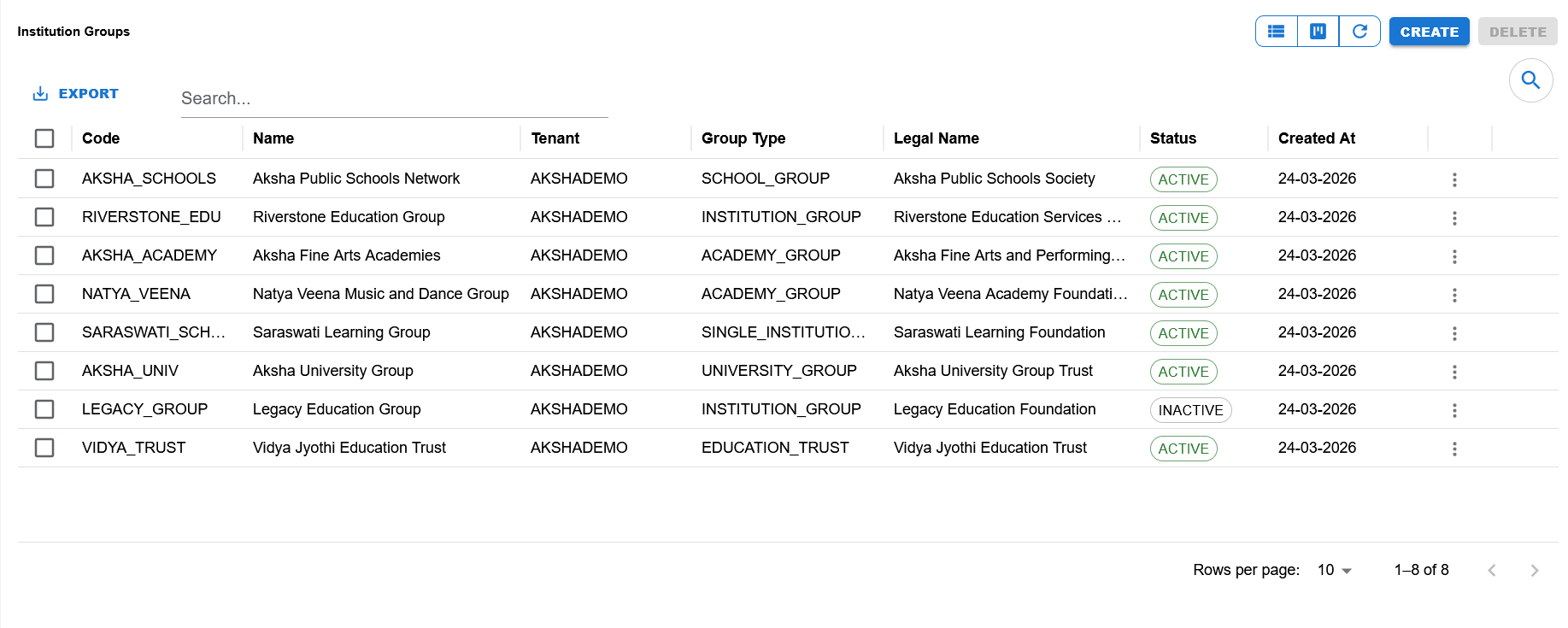
List page showing search, export, visible columns, status chips, row actions, pagination, and the Create and Delete actions.
Blank entry screen showing required fields, default status, action buttons, and the summary panel in create mode.
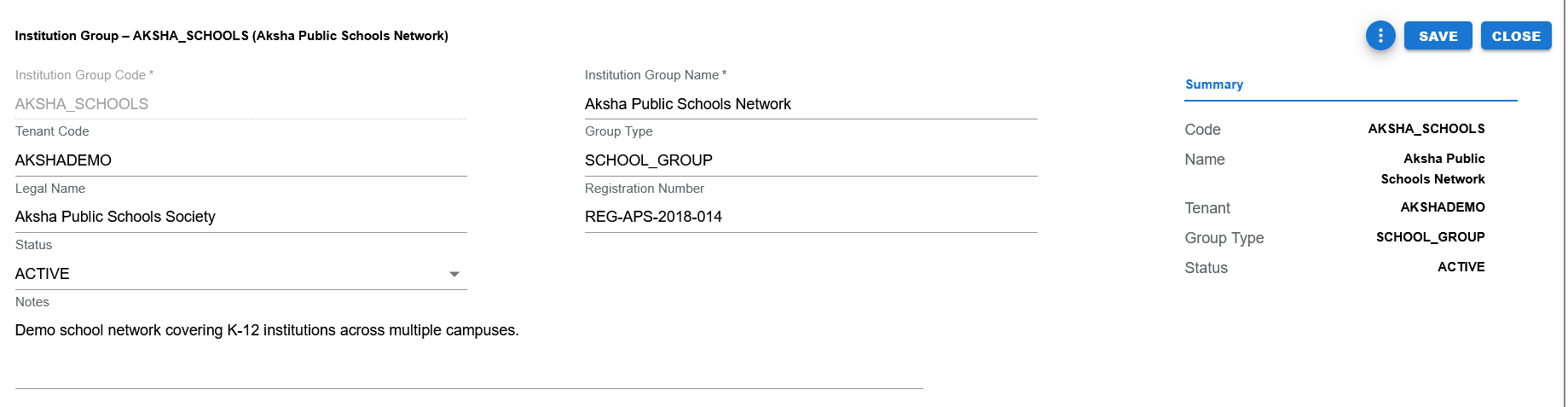
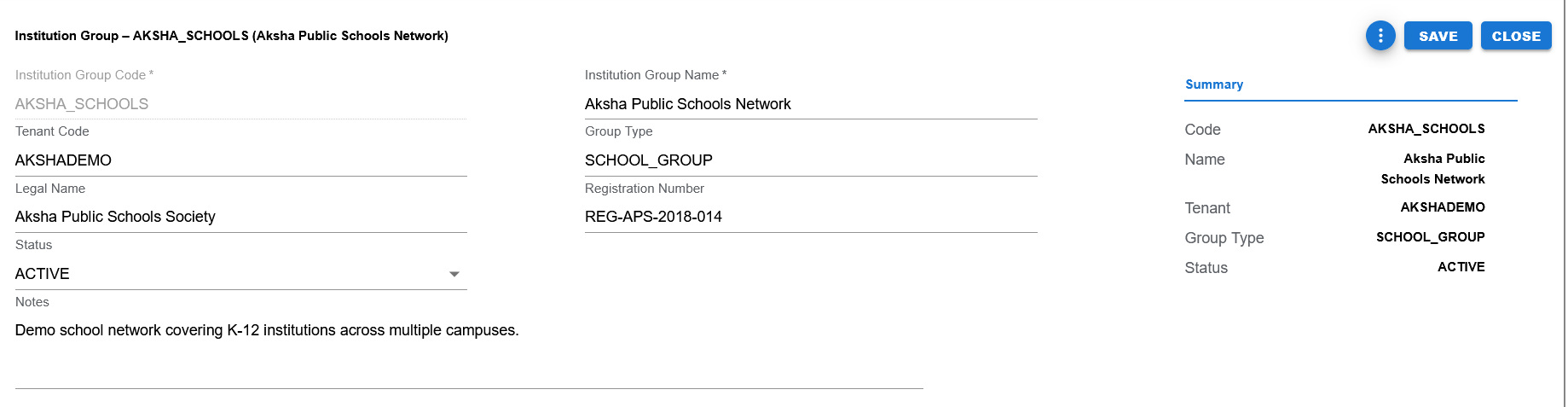
Filled example showing Institution Group Code, Name, Tenant Code, Group Type, Legal Name, Registration Number, Status, Notes, and the Summary panel.
Functional Behavior
- Supports create, update, list, search, export, and list-level delete actions in the UI.
- Save commits the record and returns to the list page.
- Apply commits the record and keeps the user on the same page.
- Close returns to the list page without continuing edits.
- The page title changes by mode: New Institution Group in create mode, and Institution Group – CODE (Name) in edit mode.
- Input sanitization converts group_code, tenant_code, group_type, and status to uppercase before save and trims optional values.
- group_code is editable on create and disabled in edit mode.
Header fields
| UI Label | Technical Field | Type | Mandatory | Value Set / LOV | Default | Description | Validation / Rules | Example |
|---|---|---|---|---|---|---|---|---|
| Institution Group Code | group_code | Text | Yes | None currently shown in UI | None | Unique identifying code for the institution group. | Required. Trimmed and saved in uppercase. Disabled in edit mode. | AKSHA_SCHOOLS |
| Institution Group Name | group_name | Text | Yes | None | None | Business name of the institution group. | Required. Trimmed before save. | Aksha Public Schools Network |
| Tenant Code | tenant_code | Text | No | None | Blank | Tenant-level code displayed on the form. | Trimmed and uppercased if entered. | AKSHADEMO |
| Group Type | group_type | Text / Controlled Type | No in current UI | Expected controlled valueset field | Blank | Categorizes the institution group. | Trimmed and uppercased before save. Current examples include SCHOOL_GROUP, UNIVERSITY_GROUP, ACADEMY_GROUP, EDUCATION_TRUST, SINGLE_INSTITUTION_GROUP, and INSTITUTION_GROUP. | SCHOOL_GROUP |
| Legal Name | legal_name | Text | No | None | Blank | Registered or legal name of the institution group. | Optional. Trimmed before save. | Aksha Public Schools Society |
| Registration Number | registration_number | Text | No | None | Blank | Registration or legal reference number. | Optional. Trimmed before save. | REG-APS-2018-014 |
| Status | status | Dropdown | Yes | EDU_STATUS style controlled field | ACTIVE | Current business status of the institution group. | Required. Current UI supports only ACTIVE and INACTIVE. | ACTIVE |
| Notes | notes | Multiline Text | No | None | Blank | Free-text notes about the institution group. | Optional. Trimmed before save. | Demo school network covering K-12 institutions across multiple campuses. |
Page and list actions
| Action | Purpose | Available On | Validation | Outcome |
|---|---|---|---|---|
| Create | Opens create mode for a new institution group record. | List page | None before opening. | User can enter a new record. |
| Save | Saves the current record and returns to the list page. | Create / Edit page | Code required, Name required, Status must be ACTIVE or INACTIVE. | Record is created or updated and success message is shown. |
| Apply | Saves the current record and stays on the current page. | Create / Edit page action menu | Same validation as Save. | Record is created or updated and the page remains open. |
| Close | Closes the page and returns to the list. | Create / Edit page | None. | User returns to the list page. |
| Export | Exports list data. | List page | Depends on the current list data. | Export output is produced. |
| Delete | Delete action exists in the list UI. | List page | No special business rule has been finalized yet. | Behavior can be tightened later when downstream dependency rules are defined. |
| Search | Filters visible list rows. | List page | None. | Matching rows remain visible. |
Current controlled values
| Field | Value Set Code | Allowed Values | Notes |
|---|---|---|---|
| Status | EDU_STATUS (expected pattern) | ACTIVE, INACTIVE | Current UI explicitly supports only ACTIVE and INACTIVE. |
| Group Type | To be aligned to a dedicated EDU_ value set | SCHOOL_GROUP, UNIVERSITY_GROUP, ACADEMY_GROUP, EDUCATION_TRUST, SINGLE_INSTITUTION_GROUP, INSTITUTION_GROUP | Current page still shows this as a text field, but Education documentation should treat type fields as controlled valueset fields once finalized. |
Status values
| Status | Meaning | Notes |
|---|---|---|
| ACTIVE | Institution Group is available for normal operational use. | Default in schema and current UI. |
| INACTIVE | Institution Group exists but is not active for normal operational use. | Demo data includes inactive records for testing and reporting scenarios. |
- Institution Group Code is required.
- Institution Group Name is required.
- Status must be ACTIVE or INACTIVE.
- Optional blank fields are saved as null after sanitization.
- Code, tenant, group type, and status are normalized to uppercase before save.
- No special delete restriction is defined yet in the documentation standard for this feature.
Operational reference
| Item | Value |
|---|---|
| Feature Structure | Header Only |
| Operational Scope | Defines the top-level grouping used to organize one or more institutions under a common parent identity. |
| Used Before | Institutions and other downstream education setup masters. |
| Typical Use | School networks, university groups, academy groups, trusts, and standalone education entities. |
| Public Documentation Note | This public page focuses on user-visible setup guidance and intentionally omits internal technical details. |
Example Record
Sample institution group
| Field | Example Value |
|---|---|
| Institution Group Code | AKSHA_SCHOOLS |
| Institution Group Name | Aksha Public Schools Network |
| Tenant Code | AKSHADEMO |
| Group Type | SCHOOL_GROUP |
| Legal Name | Aksha Public Schools Society |
| Registration Number | REG-APS-2018-014 |
| Status | ACTIVE |
| Notes | Demo school network covering K-12 institutions across multiple campuses. |