
Documentation
Campuses
Campuses defines the physical or operational campus, branch, wing, center, or location under an Institution. This page documents the campus header, reusable campus-scoped child tabs, fields, actions, valuesets, LOVs, validations, screenshots, and example usage using the locked AkshaEDU pattern.
Purpose
Campuses is used to define the campus, branch, wing, center, satellite location, or operating site that belongs to an Institution.
This feature sits after Institutions in the Education dependency order and is used as a location reference by academic units, timetable, attendance, learners, staff, and other downstream education processes. In the UI, the campus header is maintained directly and the child tabs reuse institution child structures in a campus-scoped way.
Business Purpose
Use Campuses when one Institution operates through multiple locations such as main campus, north campus, south campus, city campus, performance campus, innovation park, or training center.
Campuses gives each operating location its own code, type, contact details, and reusable campus-scoped child information so setup can remain structured without duplicating Institution masters.
- Supports multi-campus institutions and branch-style education setups.
- Provides a campus-level reference for downstream academic and operational processes.
- Reuses Contacts, Addresses, Affiliations, and Settings in a campus-scoped manner so campus details stay structured and consistent.
Screen Structure
Available screens and regions
| Screen / Region | Purpose | Notes |
|---|---|---|
| List Page | Displays campuses with search, export, visible columns, row actions, pagination, and selection. | Visible columns include Institution Code, Institution, Campus Code, Campus Name, Campus Type, Email, and Phone. |
| General Tab | Captures the campus header details. | Header fields include Institution, Campus Code, Campus Name, Campus Type, Email, Phone, and Status. |
| Campus-Scoped Child Tabs | Maintains Contacts, Addresses, Affiliations, and Settings for the selected campus. | These tabs reuse shared institution child structures but campus is auto-filled from the campus header and locked in the child rows. |
| Summary Panel | Shows a quick snapshot of the current campus record and child row counts. | Visible in both create and edit pages, including Contacts, Addresses, Affiliations, Settings, and Status. |
Screenshots
Campuses is documented with the list page, new page, edit page, and each reusable campus-scoped child tab so the full user flow is visible.
Save these assets under the matching public docs path to have them render automatically in the documentation page.
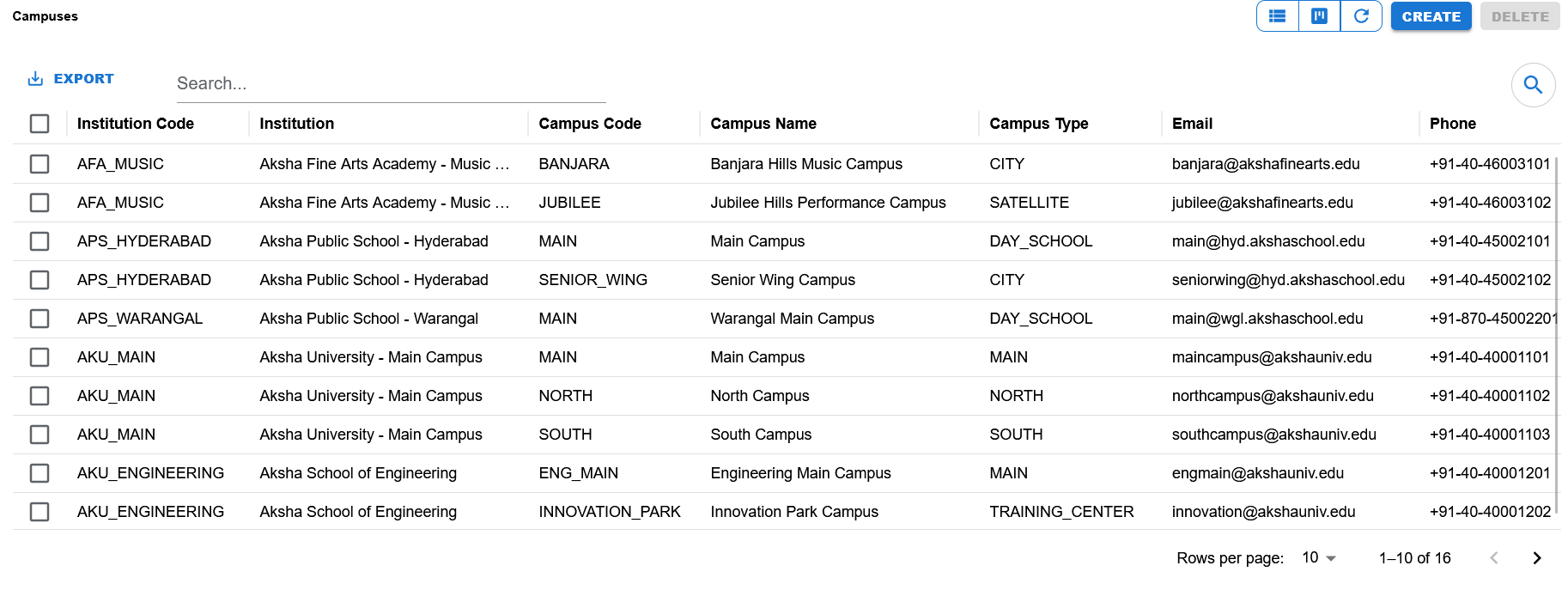
List page showing Institution Code, Institution, Campus Code, Campus Name, Campus Type, Email, Phone, export, create/delete actions, search, and pagination.
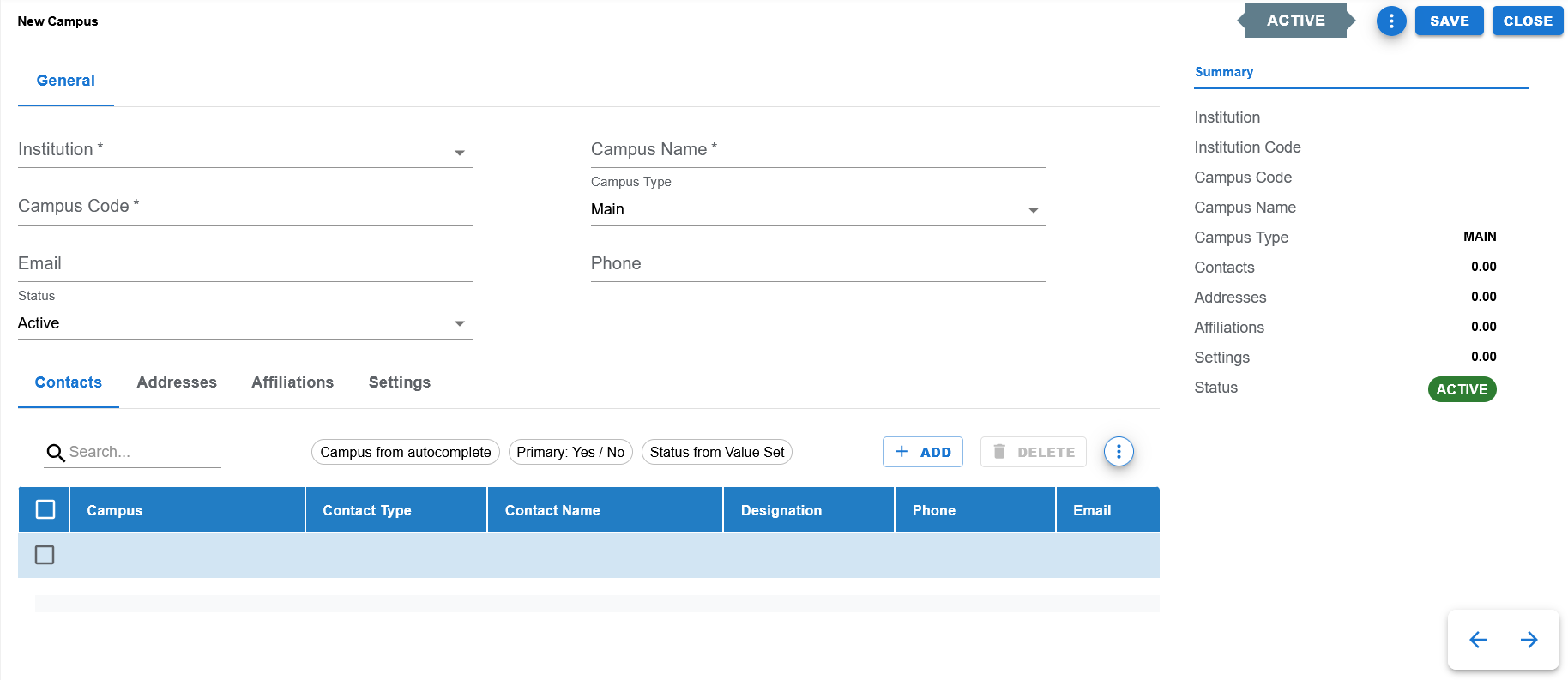
Create screen showing General tab, default Active status, Summary panel, and campus-scoped child tabs.
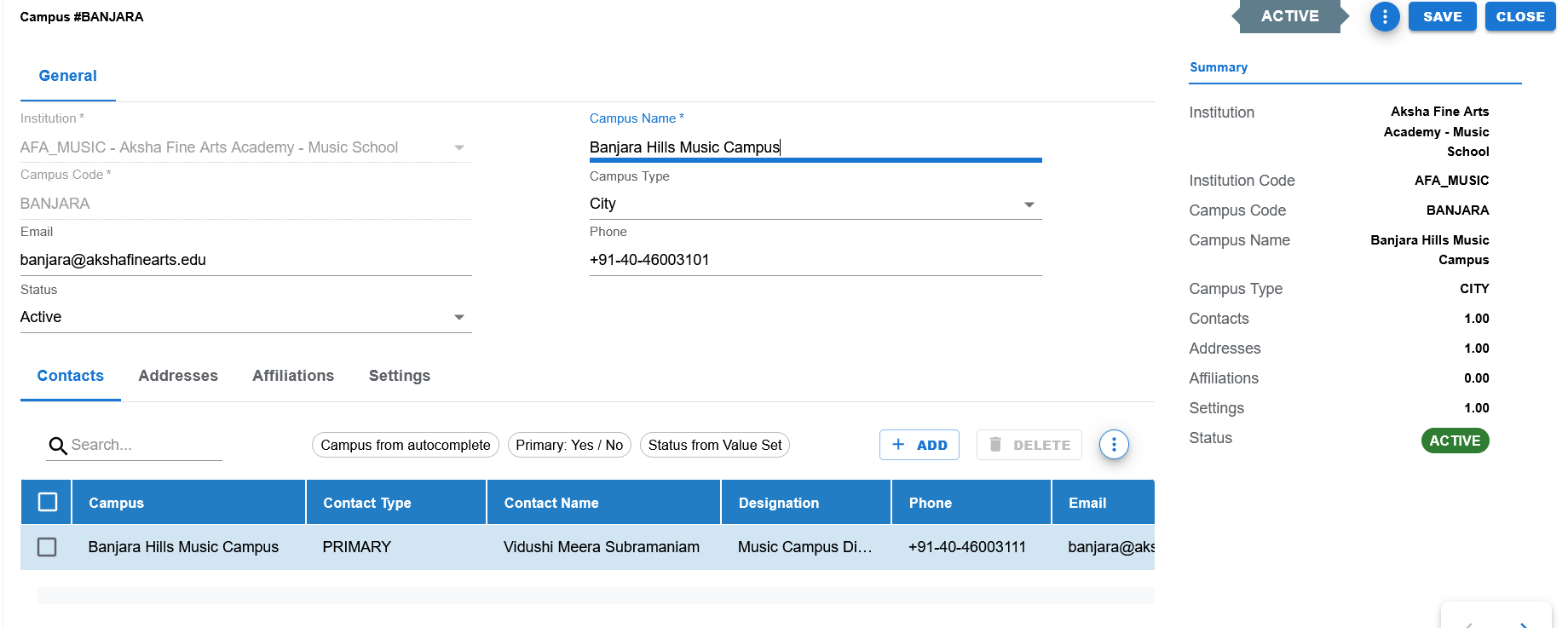
Filled edit example showing Institution, Campus Code, Campus Name, Campus Type, Email, Phone, Status, Summary panel, and the Contacts tab.
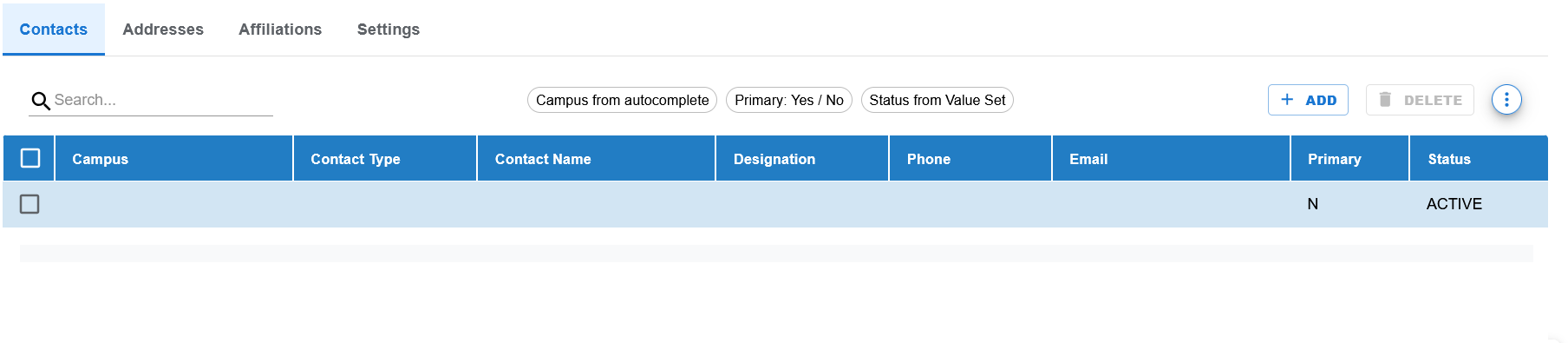
Campus-scoped Contacts tab with Campus, Contact Type, Contact Name, Designation, Phone, Email, Primary, and Status columns.
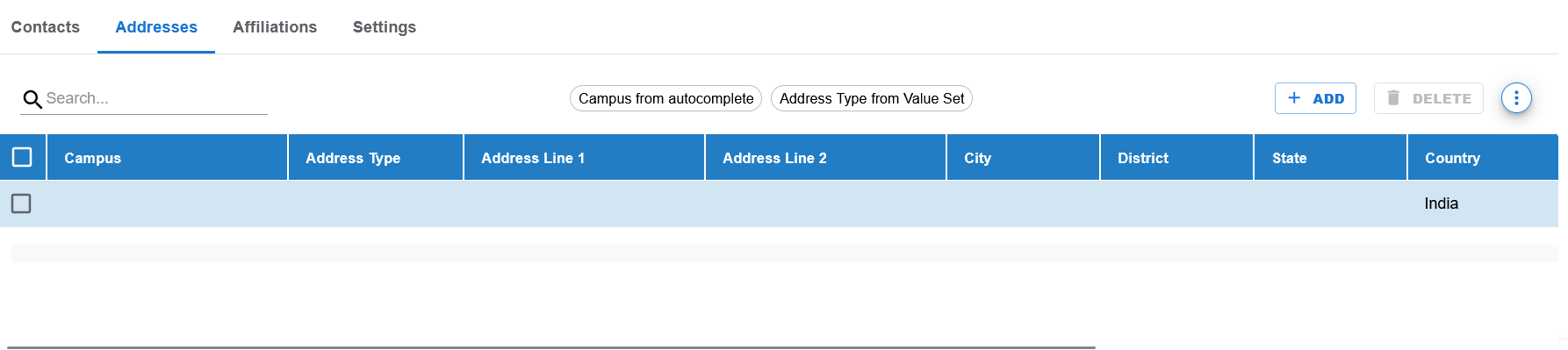
Campus-scoped Addresses tab with Campus, Address Type, Address Line 1, Address Line 2, City, District, State, and Country columns.
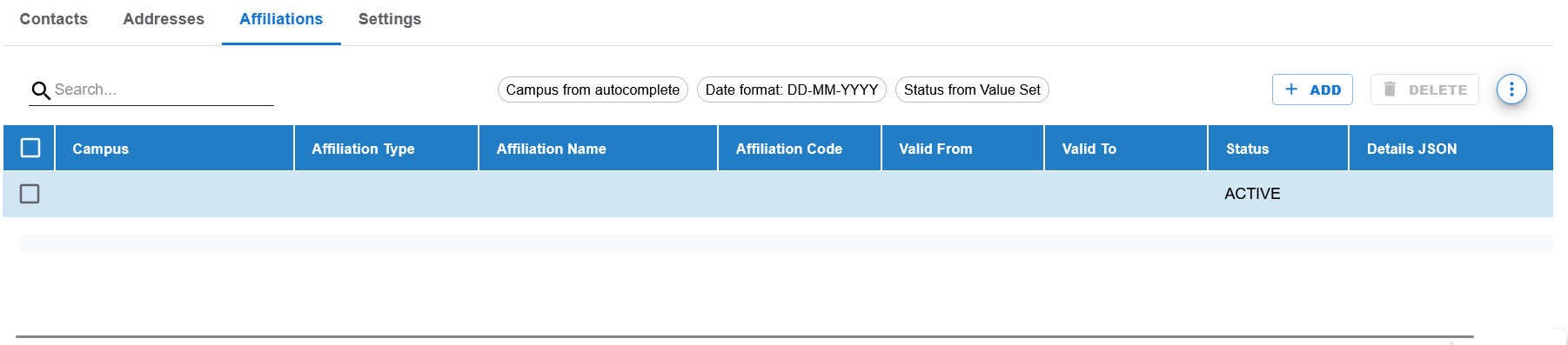
Campus-scoped Affiliations tab with Campus, Affiliation Type, Affiliation Name, Affiliation Code, Valid From, Valid To, Status, and Details JSON columns.
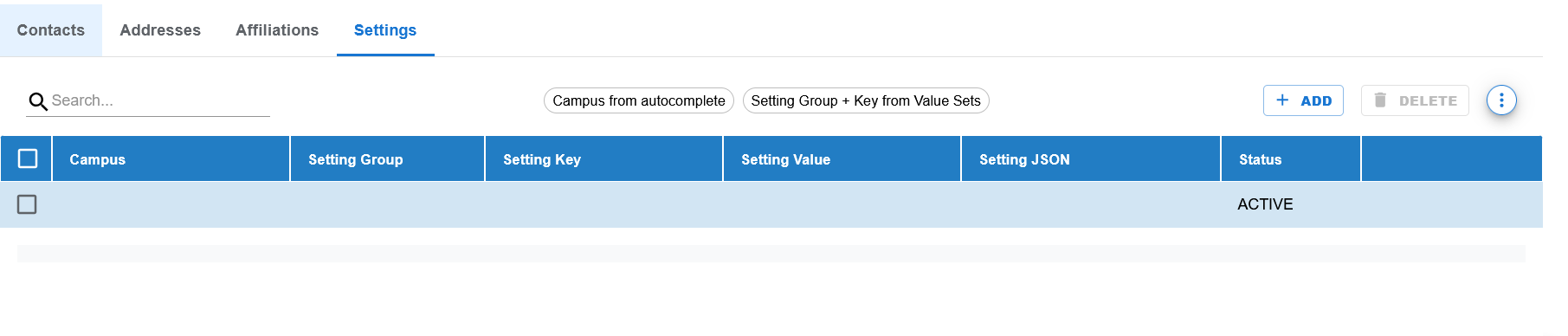
Campus-scoped Settings tab with Campus, Setting Group, Setting Key, Setting Value, Setting JSON, and Status columns.
Functional Behavior
- Supports create, update, list, search, export, and list-level delete actions in the UI.
- Institution is selected on the campus header through an LOV/autocomplete field.
- Campus Code is a required identifying field and is expected to follow the standard Education create/edit behavior where code is typically fixed after creation.
- Campus Type and Status are controlled dropdown fields.
- The page includes reusable child tabs for Contacts, Addresses, Affiliations, and Settings.
- In child tabs, campus is derived from the current header campus and should not be freely changed by the user in campus context.
- Summary panel displays institution, institution code, campus code, campus name, campus type, row counts for each child tab, and status.
Campus header fields
| UI Label | Technical Field | Type | Mandatory | Value Set / LOV | Default | Description | Validation / Rules | Example |
|---|---|---|---|---|---|---|---|---|
| Institution | institution_id | Autocomplete / LOV | Yes | Institution LOV | Blank | Institution to which the campus belongs. | Required foreign-key field. | AFA_MUSIC - Aksha Fine Arts Academy - Music School |
| Campus Code | campus_code | Text | Yes | None | Blank | Unique identifying code for the campus within the institution. | Required. Expected to behave as a code field and normally locked after create. | BANJARA |
| Campus Name | campus_name | Text | Yes | None | Blank | Business name of the campus or branch. | Required. | Banjara Hills Music Campus |
| Campus Type | campus_type | Dropdown | No | EDU_CAMPUS_TYPE | Blank | Classification of the campus. | Controlled valueset field. | CITY |
| Text | No | None | Blank | Primary campus email address. | Optional. | banjara@akshafinearts.edu | ||
| Phone | phone | Text | No | None | Blank | Primary campus phone number. | Optional. | +91-40-46003101 |
| Status | status | Dropdown | Yes | EDU_STATUS | ACTIVE | Current business status of the campus. | Required controlled field. | ACTIVE |
Campus-Scoped Child Tabs Overview
Reusable child tabs
| Tab Name | Purpose | Notes |
|---|---|---|
| Contacts | Maintain campus-level contacts such as principal office, front office, or campus lead. | Campus is auto-filled from the campus header and shown as a read-only derived reference in campus context. |
| Addresses | Maintain campus-level address records. | Useful when institution and campus addresses differ or multiple campus addresses are needed. |
| Affiliations | Maintain campus-level affiliations, approvals, or external references. | Includes date fields and JSON details support. |
| Settings | Maintain grouped campus settings and keys. | Used for campus-specific operational parameters or overrides. |
Contacts Tab Fields
Contacts tab columns
| Column | Description | Type / Source | Notes |
|---|---|---|---|
| Campus | Derived campus reference | Autocomplete / derived from header | Auto-filled from current campus context. |
| Contact Type | Type of contact | EDU_CONTACT_TYPE | Controlled valueset field. |
| Contact Name | Name of the contact person | Text | Campus-level contact person. |
| Designation | Role or designation | Text | Optional. |
| Phone | Contact phone | Text | Optional. |
| Contact email | Text | Optional. | |
| Primary | Primary contact flag | EDU_YES_NO | Shown in UI as Yes / No. |
| Status | Current row status | EDU_STATUS | Controlled valueset field. |
Addresses Tab Fields
Addresses tab columns
| Column | Description | Type / Source | Notes |
|---|---|---|---|
| Campus | Derived campus reference | Autocomplete / derived from header | Auto-filled from current campus context. |
| Address Type | Address classification | EDU_ADDRESS_TYPE | Controlled valueset field. |
| Address Line 1 | Primary address line | Text | Main address text. |
| Address Line 2 | Secondary address line | Text | Optional. |
| City | City name | Text | Optional. |
| District | District name | Text | Optional. |
| State | State name | Text | Optional. |
| Country | Country name | Text | Defaults to India in many education examples. |
Affiliations Tab Fields
Affiliations tab columns
| Column | Description | Type / Source | Notes |
|---|---|---|---|
| Campus | Derived campus reference | Autocomplete / derived from header | Auto-filled from current campus context. |
| Affiliation Type | Affiliation category | EDU_AFFILIATION_TYPE | Controlled valueset field. |
| Affiliation Name | Affiliation or authority name | Text | Optional but normally expected when record exists. |
| Affiliation Code | Reference code | Text | Optional. |
| Valid From | Validity start date | Date | UI format DD-MM-YYYY, save format YYYY-MM-DD. |
| Valid To | Validity end date | Date | UI format DD-MM-YYYY, save format YYYY-MM-DD. |
| Status | Current row status | EDU_STATUS | Controlled valueset field. |
| Details JSON | Structured details payload | JSON / text | For additional structured metadata. |
Settings Tab Fields
Settings tab columns
| Column | Description | Type / Source | Notes |
|---|---|---|---|
| Campus | Derived campus reference | Autocomplete / derived from header | Auto-filled from current campus context. |
| Setting Group | Grouped setting category | EDU_INSTITUTION_SETTING_GROUP | Controlled valueset field. |
| Setting Key | Specific setting key | EDU_INSTITUTION_SETTING_KEY | Controlled valueset field. |
| Setting Value | Simple value | Text | Used when a plain text value is sufficient. |
| Setting JSON | Structured value payload | JSON / text | Used for richer configuration when needed. |
| Status | Current row status | EDU_STATUS | Controlled valueset field. |
Page and line actions
| Action | Purpose | Available On | Validation | Outcome |
|---|---|---|---|---|
| Create | Opens create mode for a new campus record. | List page | None before opening. | User can create a new campus. |
| Save | Saves the current campus and its child rows. | Create / Edit page | Header mandatory fields and child validations must pass. | Campus data is committed. |
| Close | Closes the page and returns to the list. | Create / Edit page | None. | User returns to the list page. |
| Add | Adds a new child row in the active child tab. | Contacts / Addresses / Affiliations / Settings tabs | Depends on tab validation rules. | A blank row is inserted. |
| Delete | Deletes selected rows in the current child tab or selected list rows depending on context. | List page and child tabs | Depends on persistence state and business rules. | Rows are removed or marked for deletion. |
| Search | Filters visible list rows or tab rows. | List page and child tabs | None. | Matching rows remain visible. |
- Child tabs follow the standard AkshaEDU row-operation contract.
- C = Create
- E = Edit
- D = Delete
- N = No Change
- Unsaved deleted rows are removed from UI state, while persisted deleted rows remain tracked until save.
Controlled values
| Field | Value Set Code | Allowed Values / Examples | Notes |
|---|---|---|---|
| Campus Type | EDU_CAMPUS_TYPE | MAIN, CITY, SATELLITE, DAY_SCHOOL, NORTH, SOUTH, TRAINING_CENTER and other seeded values | Campus classification on the header. |
| Status | EDU_STATUS | ACTIVE, INACTIVE | Used on header and multiple child tabs. |
| Contact Type | EDU_CONTACT_TYPE | Campus contact categories | Used in Contacts tab. |
| Address Type | EDU_ADDRESS_TYPE | REGISTERED, CORPORATE, CAMPUS, BILLING, SHIPPING, CORRESPONDENCE | Used in Addresses tab. |
| Affiliation Type | EDU_AFFILIATION_TYPE | BOARD, UNIVERSITY, COUNCIL, ACCREDITATION, APPROVAL, ASSOCIATION, CERTIFICATION | Used in Affiliations tab. |
| Setting Group | EDU_INSTITUTION_SETTING_GROUP | ACADEMIC, ADMISSION, EXAMINATION, FEE, COMMUNICATION, ATTENDANCE, TRANSPORT, HOSTEL, LIBRARY, GENERAL | Used in Settings tab. |
| Setting Key | EDU_INSTITUTION_SETTING_KEY | Seeded institution/campus setting keys | Used in Settings tab. |
| Primary | EDU_YES_NO | Y, N | Shown in UI as Yes / No on Contacts tab. |
Reference data and lookups
| Field | Source | Usage |
|---|---|---|
| Institution | Institutions | Used to attach a campus to a parent institution. |
| Campus in child tabs | Current campus header | Auto-filled and locked in campus context rather than chosen freely. |
| Setting Group / Setting Key | Education value sets | Used for campus-specific settings rows. |
| Child-tab type fields | Education value sets | Used for contact, address, affiliation, and status control. |
Status values
| Status | Meaning | Notes |
|---|---|---|
| ACTIVE | Campus or child row is available for normal operational use. | Default active state in the UI examples. |
| INACTIVE | Campus or child row exists but is not active for normal operational use. | Useful for controlled deactivation and history. |
- Institution is required.
- Campus Code is required.
- Campus Name is required.
- Status is required.
- Campus Type should come from a controlled Education valueset.
- Child rows are campus-scoped and should inherit campus context from the current header.
- Affiliation date fields must display in DD-MM-YYYY and save in YYYY-MM-DD.
- Summary panel row counts help verify campus-level setup completeness across child tabs.
Operational reference
| Item | Value |
|---|---|
| Feature Structure | Campus header with campus-scoped information tabs |
| Operational Scope | Defines campus or branch-level identity, communication details, affiliations, and local settings. |
| Related Tabs | Contacts, Addresses, Affiliations, and Settings. |
| Used Before | Buildings, Rooms, Shifts, campus-level Academic Years, and campus-scoped academic operations. |
| Public Documentation Note | This public page focuses on setup flow and campus usage and intentionally excludes internal technical details. |
Example Record
Sample campus
| Field | Example Value |
|---|---|
| Institution | Aksha Fine Arts Academy - Music School |
| Institution Code | AFA_MUSIC |
| Campus Code | BANJARA |
| Campus Name | Banjara Hills Music Campus |
| Campus Type | CITY |
| banjara@akshafinearts.edu | |
| Phone | +91-40-46003101 |
| Contacts Count | 1 |
| Addresses Count | 1 |
| Affiliations Count | 0 |
| Settings Count | 1 |
| Status | ACTIVE |