
Documentation
Buildings
Buildings defines the physical building structures under an institution and campus, such as academic blocks, administration blocks, libraries, labs, hostels, and similar facilities. This page follows the locked AkshaEDU header-only standard and documents purpose, navigation, screens, fields, actions, valuesets, validations, and examples.
Purpose
Buildings is used to define the physical building structures available within a campus, such as academic buildings, administration blocks, libraries, laboratories, or other named facilities.
This feature belongs to AkshaEDU Setup > Institution Setup and follows the standard Education header-only list and view pattern for setup masters.
Business Purpose
Use Buildings when the institution needs a structured definition of campus infrastructure. This helps standardize physical locations before creating downstream records such as rooms, facilities allocation, timetable room references, or campus infrastructure reporting.
Buildings sits after Campus setup because each building belongs to a specific Institution and Campus context.
- Supports campus-wise physical infrastructure setup.
- Provides a clean parent structure for Rooms and later infrastructure-related features.
- Enables building-type classification and floor-count tracking.
- Useful for room allocation, reporting, and academic operations planning.
Screen Overview
Available screens
| Screen | Purpose | Notes |
|---|---|---|
| List Page | Displays all building records with search, export, selection, pagination, and status display. | Visible columns include Building Code, Building Name, Institution, Campus, Building Type, Floors, and Status. |
| Create Page | Allows users to create a new building record. | Uses the standard Education ResponsiveContainer layout with Save, Close, and Apply actions. |
| Edit Page | Allows users to update an existing building record. | Building Code is visible but disabled in edit mode. |
| General Tab | Captures all building header fields. | Buildings is a header-only feature with one General tab. |
| Summary Panel | Shows the current building details on the right side. | Displays Building Code, Building Name, Institution, Campus, Building Type, Floors, and Status. |
Screenshots
Buildings is documented with three visuals shown one below another so the list page, create page, and filled edit page remain readable.
The screenshots clearly show the General tab because this is a header-only setup feature.
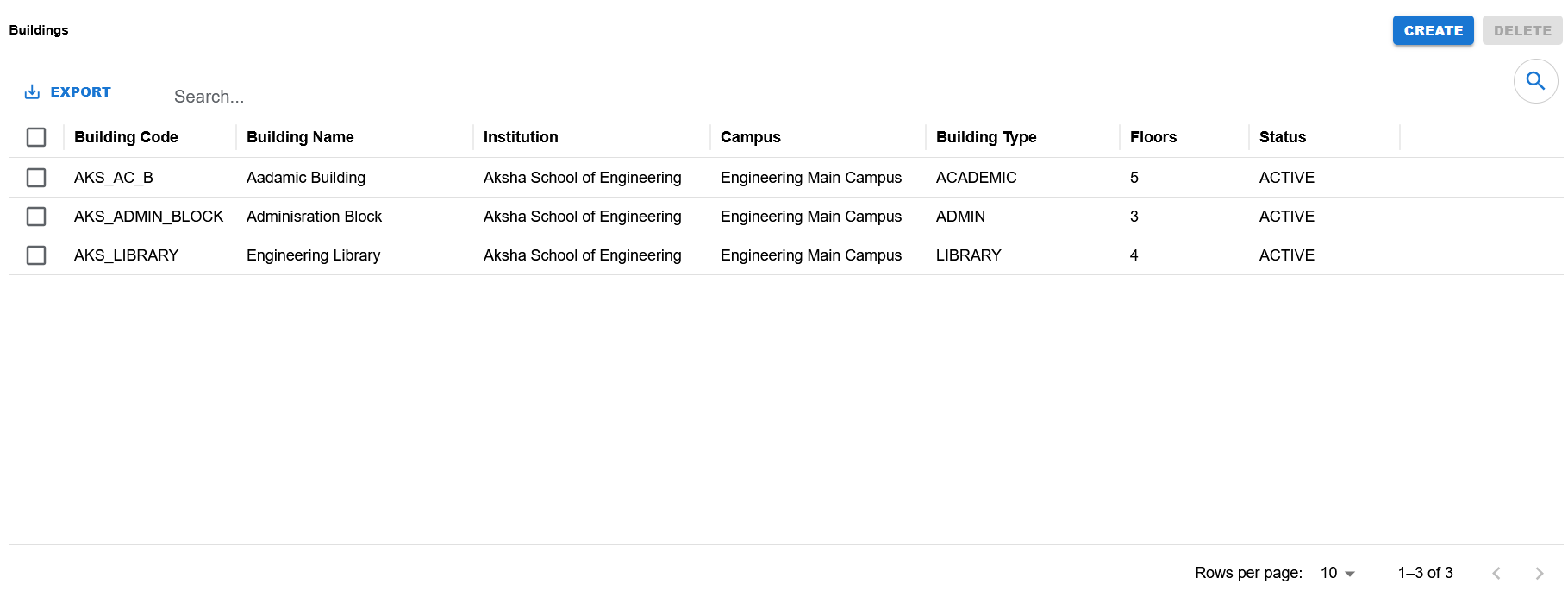
List page showing search, export, visible columns, row selection, pagination, and Create/Delete actions.
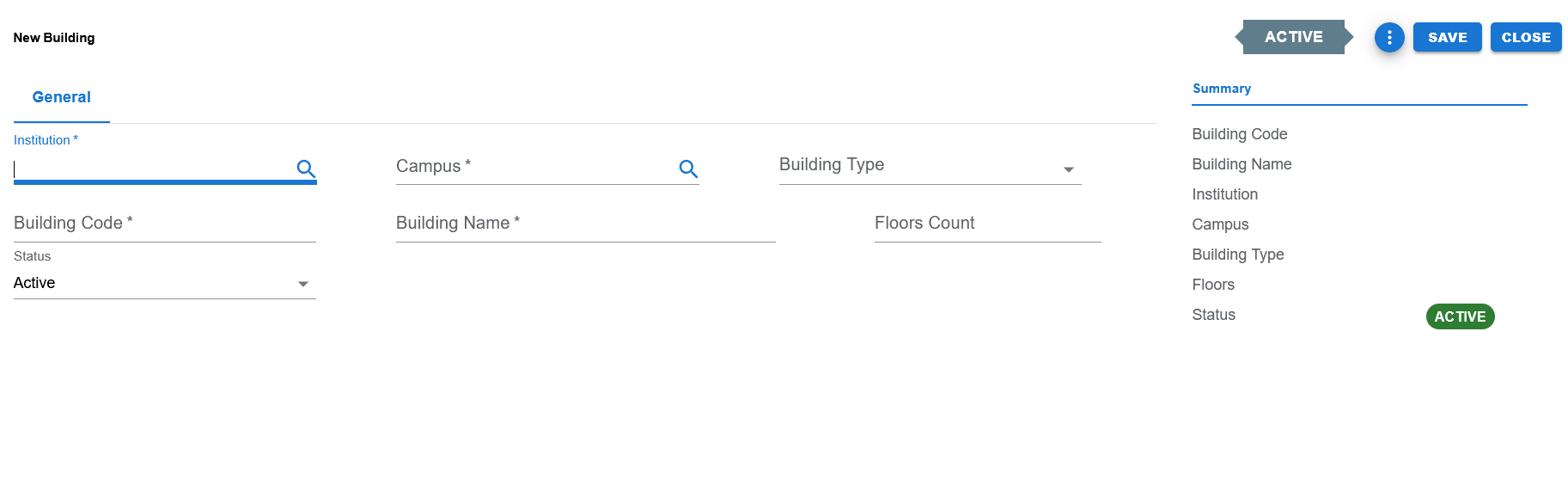
Blank create screen showing Institution, Campus, Building Type, Building Code, Building Name, Floors Count, Status, and the Save / Close / Apply actions.
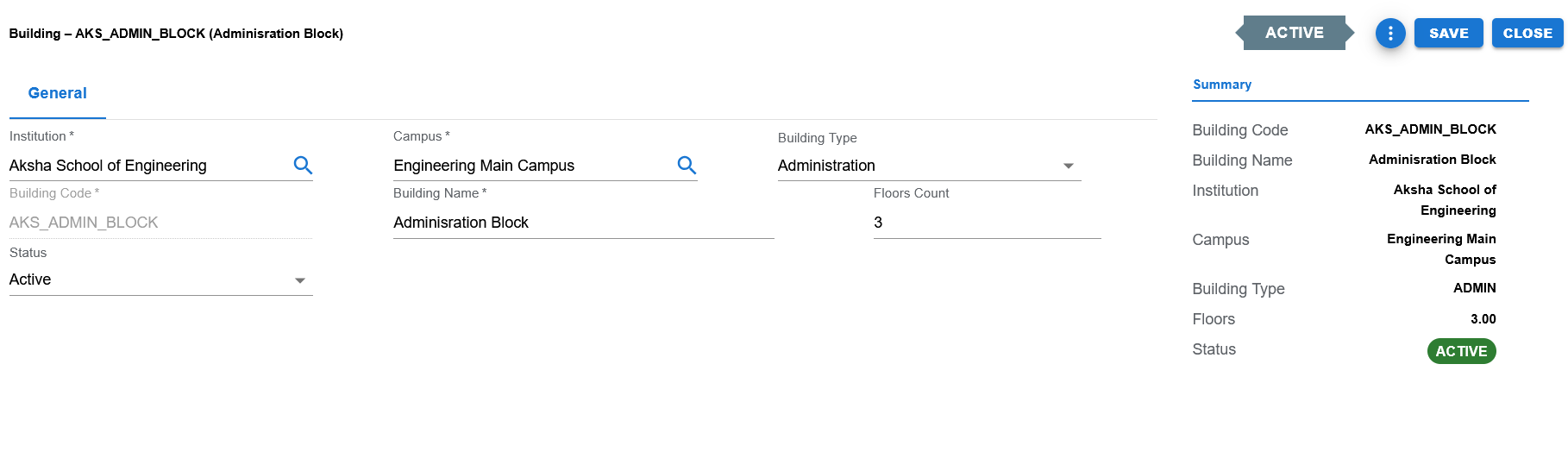
Filled example showing Institution, Campus, Building Type, Building Code, Building Name, Floors Count, Status, and the Summary panel in edit mode.
Functional Behavior
- Supports create, update, list, search, export, and list-level delete actions in the UI.
- Buildings uses a single General tab because it is a header-only setup feature.
- Save commits the record and returns to the list page.
- Apply commits the record and stays on the same page.
- Close returns to the list page without continuing edits.
- Building Code is editable during create and disabled during edit.
- The page title changes by mode: New Building in create mode, and Building – CODE (Name) or equivalent edit title in edit mode.
- The summary panel shows Building Code, Building Name, Institution, Campus, Building Type, Floors, and Status.
Building header fields
| UI Label | Technical Field | Type | Mandatory | Value Set / LOV | Default | Description | Validation / Rules | Example |
|---|---|---|---|---|---|---|---|---|
| Institution | institution_id | Autocomplete / LOV | Yes | Institution LOV | Blank | Institution under which the building is created. | Required. Acts as the parent context for Campus. | Aksha School of Engineering |
| Campus | campus_id | Autocomplete / LOV | Yes | Campus LOV | Blank | Campus under which the building exists. | Required. Expected to be filtered by the selected Institution. | Engineering Main Campus |
| Building Type | building_type | Dropdown | No in current UI | EDU_BUILDING_TYPE | Blank | Classifies the type of building. | Controlled valueset field. Examples visible in screenshots include ACADEMIC, ADMIN, and LIBRARY. | ADMIN |
| Building Code | building_code | Text | Yes | None | Blank | Unique identifying code for the building. | Required. Disabled in edit mode. | AKS_ADMIN_BLOCK |
| Building Name | building_name | Text | Yes | None | Blank | Business name of the building. | Required. | Administration Block |
| Floors Count | floors_count | Numeric | No | None | Blank | Number of floors in the building. | Optional numeric field used for infrastructure tracking. | 3 |
| Status | status | Dropdown | Yes | EDU_STATUS | ACTIVE | Current operational status of the building. | Controlled valueset field. Defaults to ACTIVE. | ACTIVE |
Controlled values
| Field | Value Set Code | Allowed Values / Examples | Notes |
|---|---|---|---|
| Building Type | EDU_BUILDING_TYPE | Examples visible from data include ACADEMIC, ADMIN, LIBRARY and other seeded education building types. | Used by the Building Type dropdown in the General tab. |
| Status | EDU_STATUS | ACTIVE, INACTIVE | Used by the Status dropdown and header status badge. |
Reference data and lookups
| Field | Source | Usage |
|---|---|---|
| Institution | Institutions | Used to select the institution context for the building. |
| Campus | Campuses | Used to select the campus context for the building. Campus belongs under the selected Institution. |
Status values
| Status | Meaning | Notes |
|---|---|---|
| ACTIVE | Building is available for normal operational use. | Default status in the current UI and examples. |
| INACTIVE | Building exists but is not active for normal operational use. | Supported through EDU_STATUS even if the screenshots mainly show ACTIVE examples. |
- Institution is required.
- Campus is required.
- Building Code is required.
- Building Name is required.
- Status defaults to ACTIVE when not changed.
- Building Code is disabled in edit mode to preserve identifier stability.
- Floors Count is optional and used as an infrastructure detail rather than a mandatory setup field.
- Building Type is a controlled classification field and should use the seeded building type valueset.
Operational reference
| Item | Value |
|---|---|
| Feature Structure | Header Only |
| Operational Scope | Defines campus buildings used for infrastructure tracking and downstream room organization. |
| Key Dependencies | Institution and Campus are required before a building can be defined. |
| Used Before | Rooms, room allocation, timetable planning, and facility-oriented setup. |
| Public Documentation Note | This public page keeps the focus on user-visible setup guidance and omits internal technical references. |
Example Record
Sample building
| Field | Example Value |
|---|---|
| Building Code | AKS_ADMIN_BLOCK |
| Building Name | Administration Block |
| Institution | Aksha School of Engineering |
| Campus | Engineering Main Campus |
| Building Type | ADMIN |
| Floors Count | 3 |
| Status | ACTIVE |