
Documentation
Classes
Classes defines the operational class master used to organize learners under an institution, campus, academic unit, and class level. This page documents purpose, navigation, screens, fields, actions, valuesets, lookups, validations, and examples using the locked AkshaEDU header-only standard.
Purpose
Classes is used to define the class master that represents a learner grouping such as Grade 1, Grade 2, or another academic delivery unit within an institution.
This feature belongs to AkshaEDU Setup > Academic Setup and follows the standard Education header-only pattern with list page, create/edit page, summary panel, controlled status, and dependent academic lookups.
Business Purpose
Use Classes to define the standard academic class structure under an institution. A class can be associated with a campus, academic unit, class level, and class type depending on how the institution organizes delivery.
Classes becomes a core dependency for downstream setup and transactions such as Sections, learner enrollment allocation, timetable planning, attendance, and assessments.
- Creates the main class master used for academic organization.
- Supports institution-level setup with optional campus and academic unit alignment.
- Allows linkage to class level and class type for standardized academic grouping.
- Acts as a prerequisite for Sections and multiple academic transactions.
Screen Overview
Available screens
| Screen | Purpose | Notes |
|---|---|---|
| List Page | Displays class records with search, export, visible columns, pagination, and row actions. | Visible columns include Class Code, Class Name, Institution, Campus, Academic Unit, Class Level, and Class Type. |
| Create / Edit Page | Allows users to create or update a single class record. | Uses the standard Education ResponsiveContainer + ContextPanel layout with Save, Close, and action menu support. |
| Summary Panel | Shows a quick summary of the current record on the right side. | Displays Institution, Campus, Academic Unit, Class Level, Class Type, and Status. |
Screenshots
Classes is best explained using three visuals shown one below another so the hierarchy lookups and summary behavior remain readable.
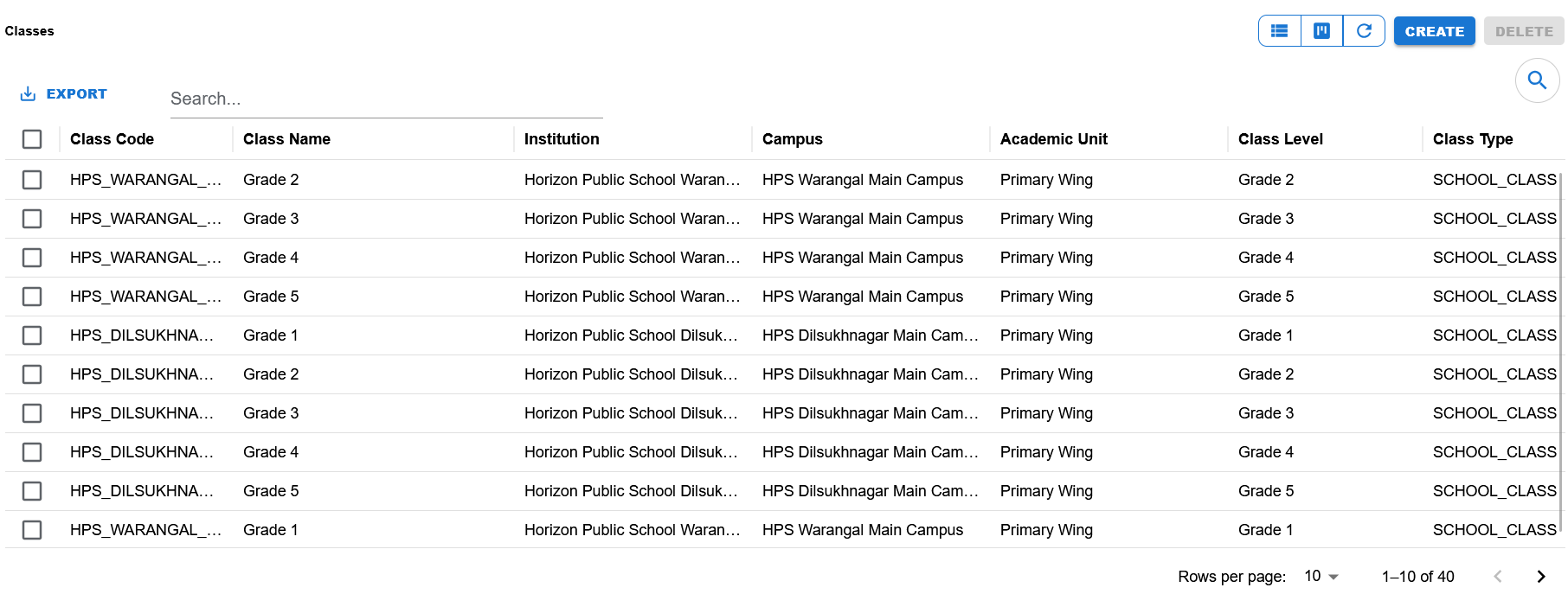
List view showing search, export, visible columns, list controls, and class records grouped by institution and campus.
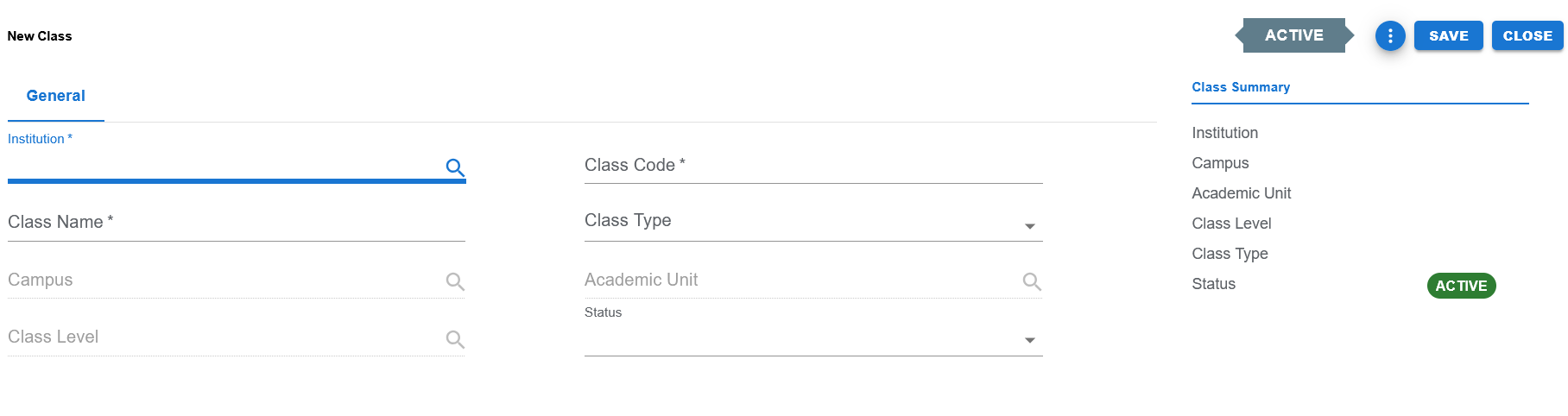
Blank entry screen showing Institution, Class Code, Class Name, Campus, Class Type, Academic Unit, Class Level, Status, and the summary panel.
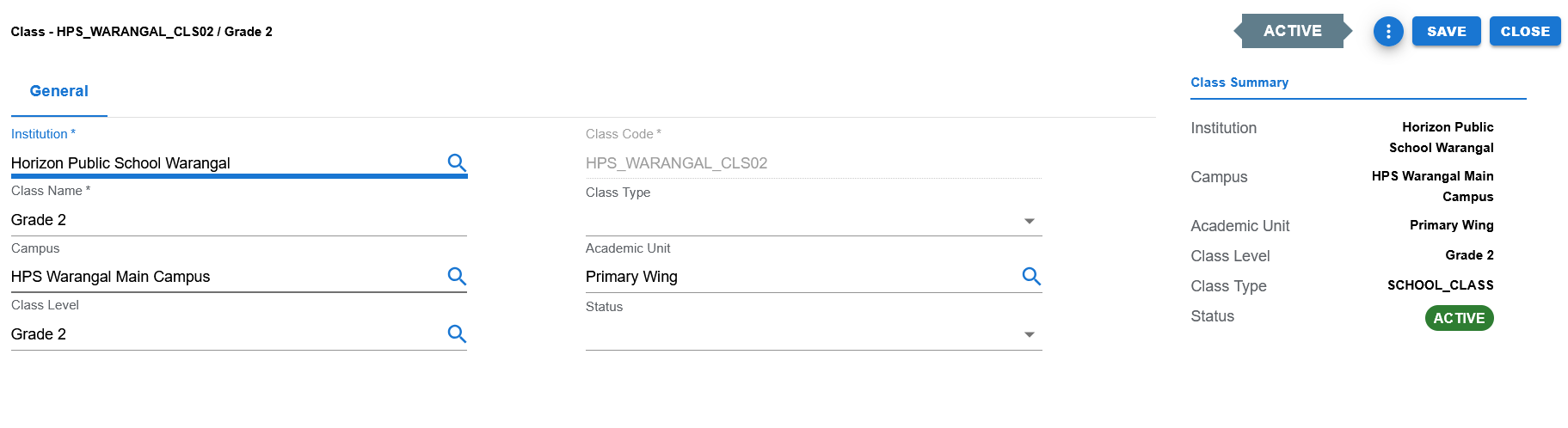
Filled example showing a class linked to Horizon Public School Warangal, HPS Warangal Main Campus, Primary Wing, Grade 2, and SCHOOL_CLASS type.
Functional Behavior
- Supports create, update, list, search, export, and list-level delete actions in the UI.
- Save commits the record and returns to the list page.
- Apply saves and stays on the same page when supported through the page action menu.
- Close returns to the list page without continuing edits.
- Class Code is typically editable on create and locked in edit mode, aligned with the Education code-field pattern.
- Institution should generally be selected first so dependent lookups such as Campus, Academic Unit, and Class Level can be filtered correctly.
Class header fields
| UI Label | Technical Field | Type | Mandatory | Value Set / LOV | Description | Rules / Notes | Example |
|---|---|---|---|---|---|---|---|
| Institution | institution_id | Autocomplete / LOV | Yes | Institution LOV | Institution that owns the class record. | Required parent lookup. | Horizon Public School Warangal |
| Class Code | class_code | Text | Yes | None | Unique identifying code for the class. | Required. Typically locked in edit mode as per Education code-field pattern. | HPS_WARANGAL_CLS02 |
| Class Name | class_name | Text | Yes | None | Business name of the class. | Required. | Grade 2 |
| Campus | campus_id | Autocomplete / LOV | No | Campus LOV | Optional campus under which the class is managed. | Usually filtered by institution selection. | HPS Warangal Main Campus |
| Class Type | class_type | Dropdown | No / implementation dependent | Controlled class-type value set | Classifies the kind of academic class. | Shown as a controlled dropdown in the UI. | SCHOOL_CLASS |
| Academic Unit | academic_unit_id | Autocomplete / LOV | No | Academic Unit LOV | Optional academic unit responsible for the class. | Usually filtered by institution and campus context. | Primary Wing |
| Class Level | class_level_id | Autocomplete / LOV | No | Class Level LOV | Optional level mapping used to standardize class hierarchy. | Lookup-based field. Visible as Grade 2 in the sample. | Grade 2 |
| Status | status | Dropdown | Yes | EDU_STATUS | Current business status of the class. | Controlled valueset field. | ACTIVE |
Page actions
| Action | Purpose | Available On | Validation | Outcome |
|---|---|---|---|---|
| Create | Opens create mode for a new class record. | List page | None before opening. | User can enter a new class. |
| Save | Saves the current class and returns to the list page. | Create / Edit page | Mandatory fields must pass validation. | Class is created or updated. |
| Apply | Saves the current class and remains on the same page when supported. | Create / Edit page action menu | Same validation as Save. | Class is saved without leaving the page. |
| Close | Closes the page and returns to the list. | Create / Edit page | None. | User returns to the list page. |
| Export | Exports list data. | List page | Depends on current list contents. | Export output is produced. |
| Delete | Delete action exists in the list UI. | List page | Depends on dependency rules and implementation behavior. | Selected records may be removed where allowed. |
| Search | Filters visible list rows. | List page | None. | Matching rows remain visible. |
Controlled values
| Field | Value Set Code | Allowed Values / Examples | Notes |
|---|---|---|---|
| Status | EDU_STATUS | ACTIVE, INACTIVE | Used on the class header and summary display. |
| Class Type | Controlled class-type value set | Examples visible in data include SCHOOL_CLASS; other approved values may represent institution-specific class structures. | Use the implementation-approved class-type valueset rather than free text. |
| Class hierarchy controls | Institution-specific class-level configuration | Values depend on the institution's academic model. | Keep public documentation at a business level and avoid exposing internal configuration mechanics. |
Reference data and lookups
| Field | Source | Usage |
|---|---|---|
| Institution | Institutions | Used to select the parent institution for the class. |
| Campus | Campuses | Used where classes are campus specific. |
| Academic Unit | Academic Units | Used to place the class under a functional academic unit such as Primary Wing. |
| Class Level | Class Levels | Used to standardize class naming and grade-level structure. |
Status values
| Status | Meaning | Notes |
|---|---|---|
| ACTIVE | Class is available for normal academic and operational use. | Visible as the active state in the screenshots. |
| INACTIVE | Class exists but is not available for normal academic use. | Useful for retired or historical class structures. |
- Institution, Class Code, and Class Name are treated as core mandatory fields.
- Campus, Academic Unit, and Class Level are lookup-driven fields and may be optional depending on the institution model.
- Class Type should be selected from a controlled value list rather than entered as free text.
- Class Code should remain unique within the applicable institution and campus scope.
- Institution should generally be selected before dependent lookups such as Campus, Academic Unit, and Class Level.
- Classes should be created before downstream section setup, timetable planning, learner allocation, attendance, and assessments depend on them.
Public operational notes
| Item | Value |
|---|---|
| Feature Type | Header Only |
| Primary Scope | Institution-level class master with optional campus and academic unit alignment |
| Primary Dependencies | Institution, optional Campus, optional Academic Unit, optional Class Level |
| Used Before | Sections, learner allocation, timetable planning, attendance, and assessments |
| Public Documentation Note | This public page explains user-facing behavior only and does not expose internal implementation details. |
Example Record
Sample class
| Field | Example Value |
|---|---|
| Class Code | HPS_WARANGAL_CLS02 |
| Class Name | Grade 2 |
| Institution | Horizon Public School Warangal |
| Campus | HPS Warangal Main Campus |
| Academic Unit | Primary Wing |
| Class Level | Grade 2 |
| Class Type | SCHOOL_CLASS |
| Status | ACTIVE |